Discounts

Discounts | General Overview

Discounts in Orbit allow you to create promotional offers that customers can use during checkout. This helps you run sales campaigns, reward customers, increase conversions, and manage limited-time promotions directly from your admin panel.

5 min read2viewsUpdated 22 June 2026Orbit Support Team

Discounts in Orbit allow you to create promotional offers that customers can use during checkout. This helps you run sales campaigns, reward customers, increase conversions, and manage limited-time promotions directly from your admin panel.

Accessing Discounts

To access discounts:

  1. Log in to your Orbit admin panel.

  2. From the left-hand menu, go to Discounts.

Discounts Overview

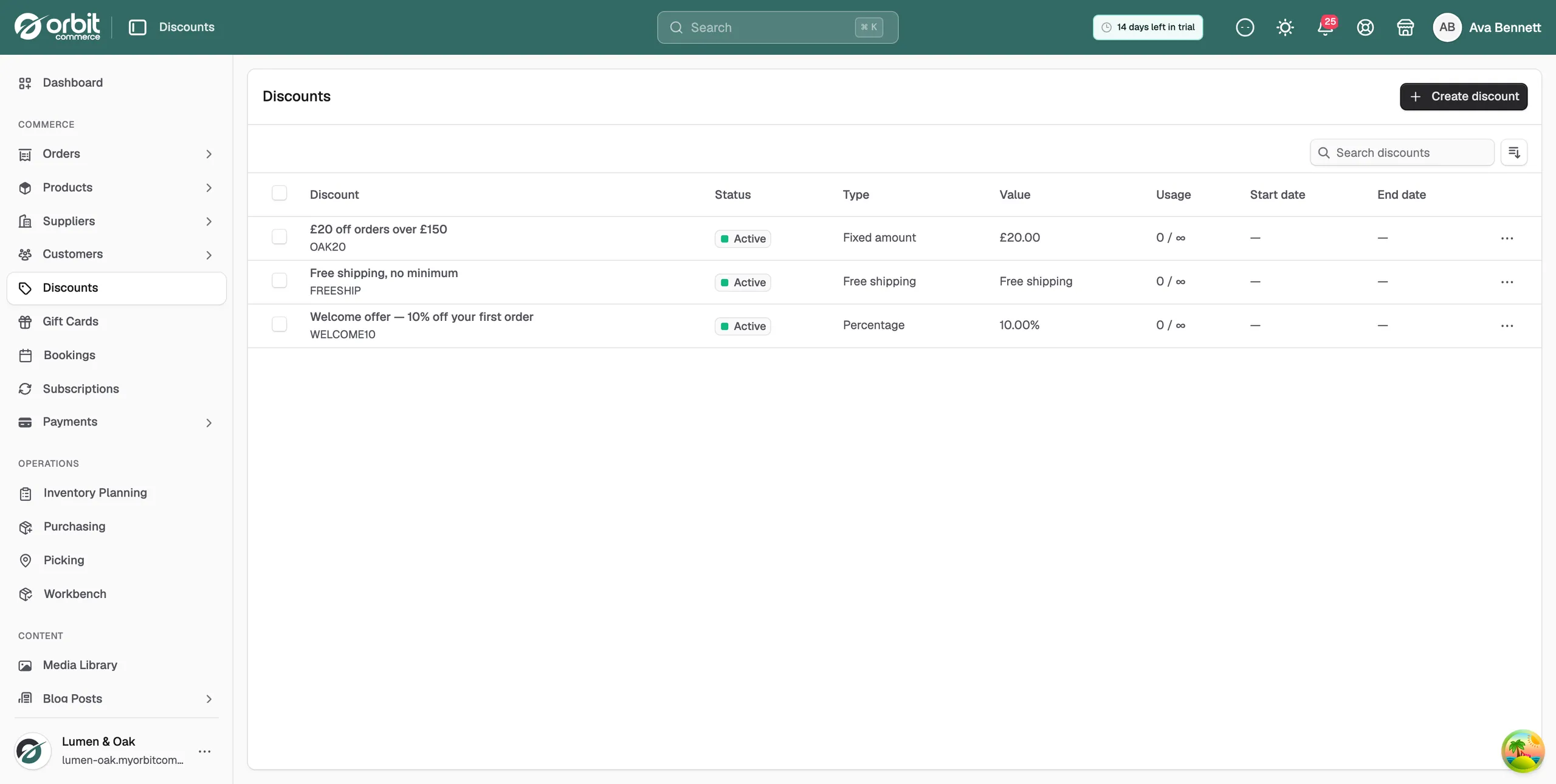
The Discounts page gives you a list of all discount codes and promotions created in your store.

From this page, you can usually see key information such as:

  • Discount name or code

  • Discount type

  • Discount value

  • Status

  • Start date

  • End date

  • Usage details

This makes it easier to monitor which discounts are currently active and which ones have expired or are no longer in use.

Creating a New Discount

To create a new discount:

  1. Go to Discounts from the left-hand menu.

  2. Select Create Discount

  3. Enter the required discount details.

  4. Configure the discount rules and conditions.

  5. Save the discount.

Once saved, the discount can be used by eligible customers depending on the rules you have set.

Discount Code

When creating a discount, you may need to enter a discount code.

This is the code customers will use at checkout to receive the discount.

For example:

SUMMER10

A clear and memorable code makes it easier for customers to use the promotion correctly.

Discount Type

Orbit may allow you to create different types of discounts depending on your store setup.

Common discount types include:

  1. Percentage discount

Applies a percentage reduction to the order, such as 10% off.

  1. Fixed amount discount

Applies a set monetary discount, such as £5 off.

  1. Product-specific discount

Applies only to selected products.

  1. Order-level discount

Applies to the full order total.

Discount Value

The discount value determines how much is taken off the customer’s order.

For example:

  • A percentage discount could be set as 10%

  • A fixed discount could be set as £5

  • A larger promotional campaign could use 20% off selected items

Make sure the value is entered correctly before saving the discount.

Discount Conditions

Discount conditions control when the discount can be used.

Depending on your setup, you may be able to apply conditions such as:

  • Minimum order value

  • Specific products

  • Specific categories

  • Customer eligibility

  • Usage limits

  • Start and end dates

Start and End Dates

You can set when a discount should become active and when it should expire.

This is useful for:

  • Seasonal sales

  • Weekend promotions

  • Launch campaigns

  • Limited-time offers

Usage Limits

Usage limits allow you to control how many times a discount can be used.

For example, you may want to limit a discount so that:

  • It can only be used once per customer

  • It can only be used a certain number of times in total

  • It is only available during a specific campaign period

Managing Existing Discounts

From the Discounts page, you can review and manage existing discounts.

You may be able to:

  • Edit discount details

  • Activate or deactivate discounts

  • Update discount dates

  • Change discount values

  • Review usage

  • Remove discounts that are no longer needed

Before editing an active discount, make sure the change will not negatively affect any current promotions or customer expectations.

Why Discounts Are Important

Discounts are a key part of ecommerce marketing. They can help encourage customers to complete their purchase, increase average order value, promote specific products, or support seasonal campaigns.

By managing discounts directly in Orbit, you can control how promotions are applied, when they are active, and which customers or orders are eligible.

If you have any questions, please contact us at support@orbitcommerce.net

Was this helpful?

0 people found this helpful