Setting conditions and limits
Add a minimum spend, choose who can use a code, cap how often it is used and set the dates it runs between.
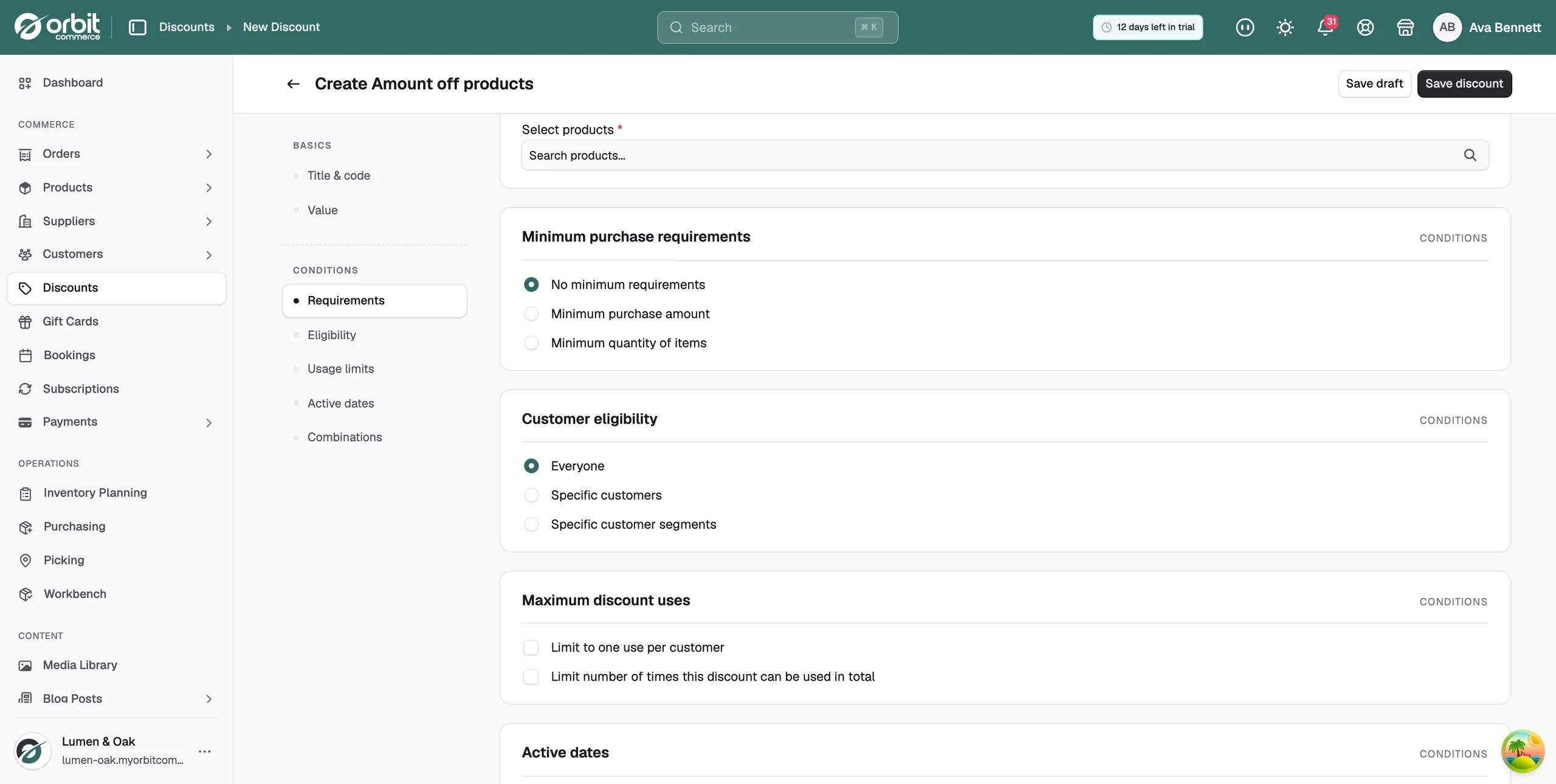
Every discount carries the same set of conditions, whatever its type. They sit under Conditions in the left-hand menu of the create and edit pages, and they control what a basket must contain, who can use the code, how often it can be used, and between which dates.
Considerations
- Everything under Conditions starts switched off. Nothing is filled in for you.
- A discount limited to chosen customers needs the shopper to be signed in. Guest checkout is refused, even when the person would qualify.
- Dates and times follow your store's time zone, not each shopper's.
- A customer can use one discount code per order.
Ask for a minimum spend or quantity
- Open the discount and click Requirements in the left-hand menu.
- Choose one of the three options in Minimum purchase requirements.
- If you chose an amount or a quantity, type the figure in the field that appears below it.
- No minimum requirements: the discount applies to any qualifying order. This is the default.
- Minimum purchase amount: the basket subtotal must reach the amount you enter.
- Minimum quantity of items: the basket must hold at least the number of units you enter. Two of the same product count as two.
Note: The subtotal is the item prices added together before delivery. A basket that only clears the minimum once postage is added does not qualify. The check runs as the basket changes, so removing an item can take the discount off again.
Choose who can use the discount
- Click Eligibility in the left-hand menu.
- Choose an option in Customer eligibility.
- For Specific customers, click Select customers and tick each customer you want. The list shows email addresses.
- Everyone: any shopper can use the code, signed in or not. This is the default.
- Specific customers: only the accounts you pick can use it.
- Specific customer segments: not working yet. See the warning below.
Warning: Do not use Specific customer segments. The segments you pick are not saved, the storefront ignores the restriction so any shopper can use the code, and you cannot apply the code to an order you raise in the dashboard. The discount also refuses to save again until you pick segments once more. Use Specific customers instead.
Limit how many times the code can be used
- Click Usage limits in the left-hand menu.
- Tick Limit to one use per customer to stop the same shopper redeeming it twice.
- Tick Limit number of times this discount can be used in total and enter a number, such as 100, to cap the whole promotion.
The two settings are separate. You can use either, both or neither. The total limit counts every customer together, and the code stops working for everyone once it is reached. One use per customer needs the shopper to be signed in, so the store can recognise them.
Set the active dates
- Click Active dates in the left-hand menu.
- Pick a Start date. The code will not work before it.
- To close the offer automatically, tick Set end date and pick an End date.
An end date runs to the end of that day, so the final day still counts. With no end date, the discount runs from its start date until you switch it off or delete it.
Note: A start date in the future does not change the status shown in the list. The discount can still read Active, and the date is checked when a shopper tries to use the code.
Combine with other discounts
The Combinations card holds three tick boxes: Combine with product discounts, Combine with order discounts and Combine with shipping discounts.
They have no effect today. Checkout takes one discount code per order, so discounts do not stack whatever you tick. Treat the card as a setting for later, not a rule your store follows now.
Save your conditions
- On a new discount, click Save discount at the top right.
- On a discount you are editing, the Unsaved changes bar appears as soon as you change a field. Click Save to keep your changes, or Discard to put every field back.
Requirements, eligibility, limits and dates all live on the same record, so one save writes the lot.
Related guides
Was this helpful?
0 people found this helpful