Creating a fixed amount discount
Set up a code that takes a set sum off the basket, such as £20 off, and add a minimum spend so it only runs on bigger orders.
3 min read3viewsUpdated 4 October 2026Orbit Commerce
A fixed amount discount takes a set sum off the basket, such as £20 off. The customer types your code at checkout. You create it under Discounts in your Orbit dashboard.
Considerations
- Every discount needs a code. Shoppers must type it at checkout, so a discount never applies on its own.
- A shopper can use one discount code per order.
- The amount uses your store's currency.
- The discount never takes off more than the basket is worth. A £20 code on a £12 basket takes off £12.
- Maximum discount amount (optional) is for percentage discounts only, so it is not on the page once you click Fixed amount.
Create a fixed amount discount
- From your Orbit dashboard, go to Discounts.
- Click Create discount. The Select discount type dialog opens.
- Click Amount off order to take the money off the whole order. Click Amount off products to take it off chosen products or collections.
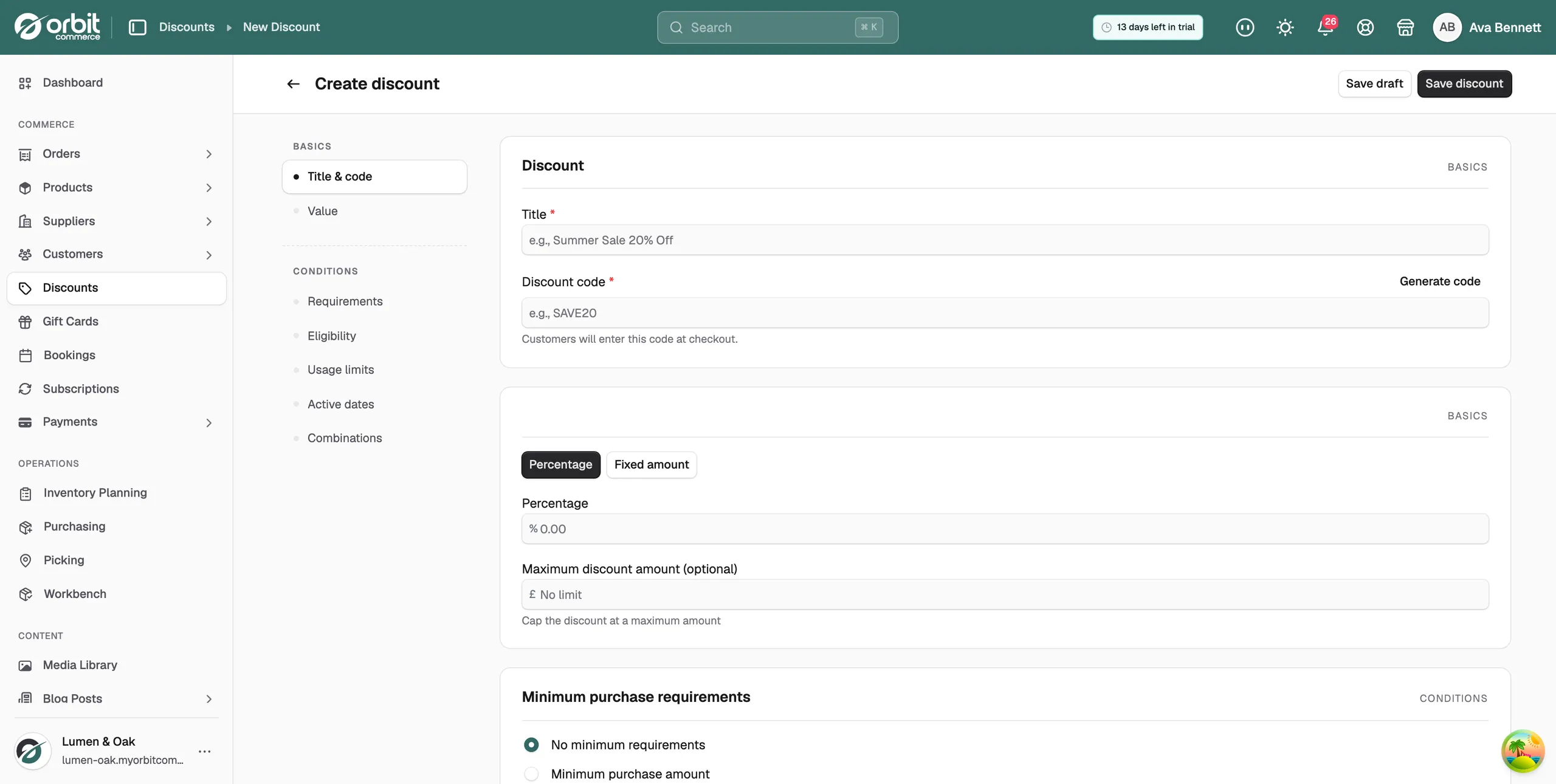
- In Title, type a name you will recognise later, such as £20 off orders over £150.
- In Discount code, type the code customers will use, or click Generate code for a random one of eight characters. The field turns your typing into capitals and keeps only letters, numbers, hyphens and underscores.
- In the Discount value card, click Fixed amount. The label above the box changes to Amount and the box takes your currency.
- In the Amount box, type the money off, for example 20.
- On Amount off products, use Applies to and Select products to pick what the discount covers.
- Click Save discount to start it straight away, or Save draft to save it as inactive. The message Discount created successfully appears and the discount's own page opens.
Ask for a minimum spend
A fixed amount code pairs well with a minimum, such as £20 off orders over £150.
- On the discount, click Requirements in the list on the left.
- In the Minimum purchase requirements card, click Minimum purchase amount.
- Type the amount the basket must reach, for example 150.
- To count items instead of money, click Minimum quantity of items and type a number.
- Save the discount.
Two things to know about the minimum:
- Shipping does not count: the minimum is checked against the item prices added together, before delivery is added.
- It is checked all the way through: if the shopper removes an item and drops below the minimum, the discount comes off again.
Note: Changing the radio button clears the figure you typed. Set the type first, then the value.
Percentage or fixed amount
- Percentage: a share of the basket, so what you give away grows with the order. You can hold it down with Maximum discount amount (optional).
- Fixed amount: the same money off any qualifying basket, so the cost to you is the same every time.
Both types sit in the same Discount value card, so you can swap between them while you build the discount.
Related guides
Was this helpful?
0 people found this helpful