Creating a percentage discount
Set up a code that takes a share off the basket, pick the products it covers, and cap what it gives away on large orders.
A percentage discount takes a share off the basket, such as 20% off. The customer types your code at checkout. You create it under Discounts in your Orbit dashboard.
Considerations
- Every discount needs a code. Shoppers must type it at checkout, so a discount never applies on its own.
- A shopper can use one discount code per order.
- The form starts on Percentage, so you do not have to pick it.
- A percentage cannot be more than 100.
- Maximum discount amount (optional) belongs to percentage discounts only. Click Fixed amount and the field leaves the page.
Create a percentage discount
- From your Orbit dashboard, go to Discounts.
- Click Create discount. The Select discount type dialog opens.
- Click Amount off products to take the percentage off chosen products or collections. Click Amount off order to take it off the whole order.
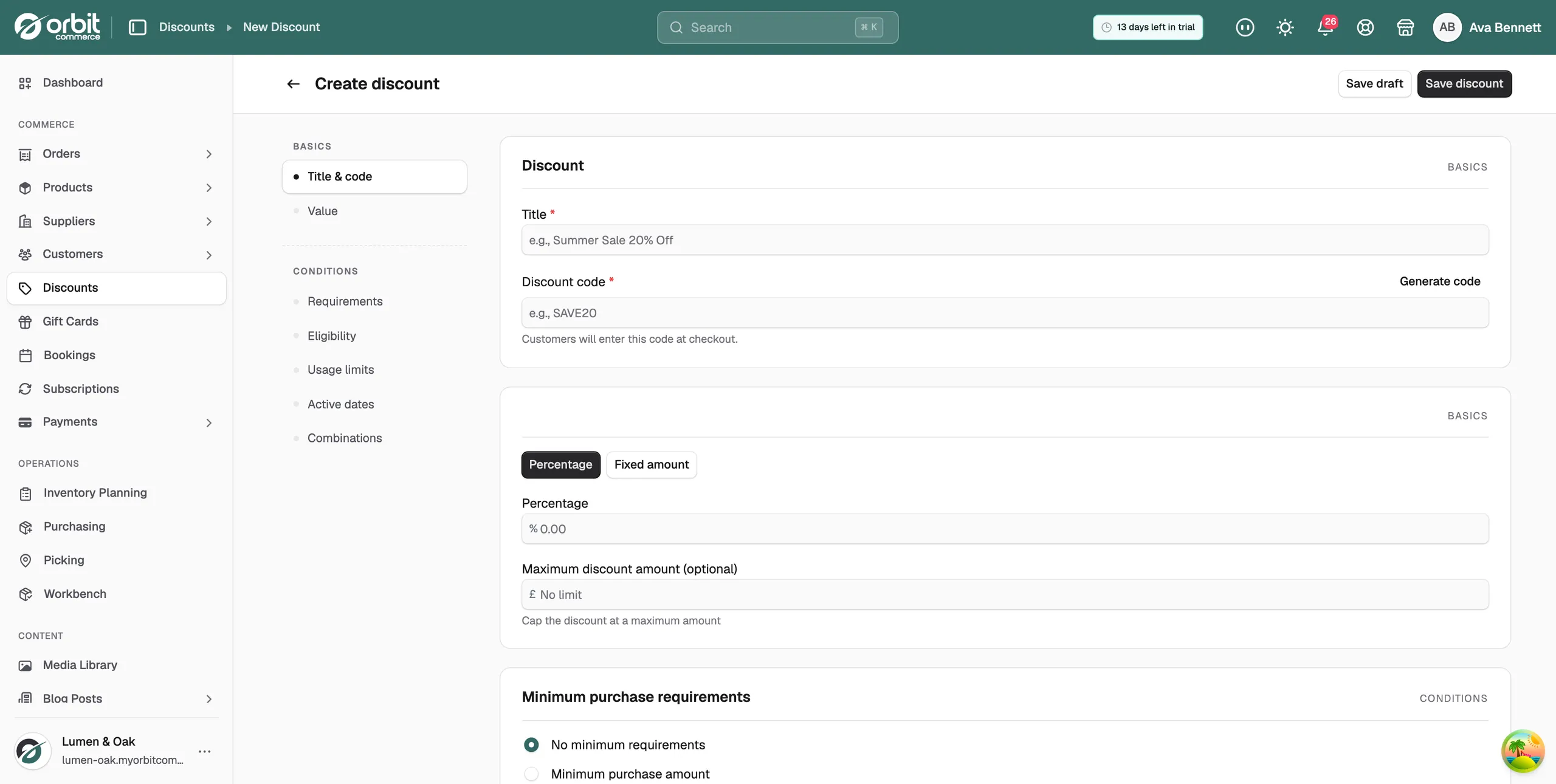
- In Title, type a name you will recognise later, such as Summer Sale 20% Off.
- In Discount code, type the code customers will use, or click Generate code for a random one of eight characters. The field turns your typing into capitals and keeps only letters, numbers, hyphens and underscores.
- In the Discount value card, leave Percentage selected.
- In the Percentage box, type the share you want off, for example 20.
- On Amount off products, pick the products the discount covers. See the next section.
- Click Save discount to start it straight away, or Save draft to save it as inactive. The message Discount created successfully appears and the discount's own page opens.
Choose which products it covers
An Amount off products discount has an Applies to list in the Discount value card.
- In Applies to, pick how far the discount reaches. It starts on Specific products.
- Click Select products and type part of a name in Search products....
- Tick each item you want. The line under the box counts them, for example 2 product(s) selected.
- Click outside the list to close it, then save.
The three choices are:
- Specific products: whole products, every variant included.
- Specific collections: everything in the collections you pick, including products you add to them later.
- Specific variants: single sizes or colours.
Tip: Collections need the least upkeep. Keep the collection up to date and the discount follows it, which suits a rolling sale section.
Cap what the discount gives away
A percentage grows with the basket. A cap stops it going further than you meant.
- In the Discount value card, find Maximum discount amount (optional).
- Type the most the discount can take off one order, for example 150.
- Leave it empty for no cap. The box then reads No limit.
- Save the discount.
Note: Switching to Fixed amount removes the cap field. Switch back to Percentage and the figure you typed is still there.
Related guides
Was this helpful?
0 people found this helpful