Scheduling a discount and checking its usage
Set the days a discount runs, turn it on or off, and read the Usage column on the Discounts list to see which codes are working.
You can set the days a discount runs and let Orbit start and stop it for you. The Discounts list then shows how many times each code has been used.
Considerations
- Dates follow your store's time zone, not each shopper's.
- A discount with no end date keeps working until you turn it off.
- An end date runs to the end of the day you pick.
- A code that is past its end date, or not yet at its start date, is refused at checkout.
Set the dates a discount runs
- From your Orbit dashboard, go to Discounts.
- Click the discount's row. The whole row opens it. You can also use the menu at the end of the row and click Edit.
- In the list on the left, click Active dates.
- Under Start date, click the calendar and pick the day the code starts working.
- To stop it on a set day, tick Set end date, then pick the End date.
- Click Save on the Unsaved changes bar at the bottom right. A message confirms the discount is saved.
Tip: Build next quarter's codes now and leave them inactive. Set their dates, then turn them on when the campaign starts.
Turn a discount on or off
- Open the discount.
- At the top of the page, open the Status list.
- Pick Active to let shoppers use the code, or Inactive to stop it.
- Click Save on the Unsaved changes bar.
On a new discount, Save discount saves it as active and Save draft saves it as inactive. An inactive code is refused at checkout, so a draft is safe to leave sitting there.
What each status means
- Active: the code works now, as long as its other conditions are met.
- Inactive: turned off. Checkout refuses the code.
- Scheduled: waiting for its start date. Orbit makes it active when the day arrives.
- Expired: past its end date. Orbit sets this itself.
You set Active and Inactive yourself. Orbit sets the other two from the dates, and checks every few minutes.
Check how often a code has been used
- From your Orbit dashboard, go to Discounts.
- Read the Usage column. It shows how many times the code has been used, then its limit. The sign for no limit is ∞.
- To find one code, type it in Search discounts.
- To reorder the list, click the sort button next to the search box and pick Created, Code or Type, then Ascending or Descending.
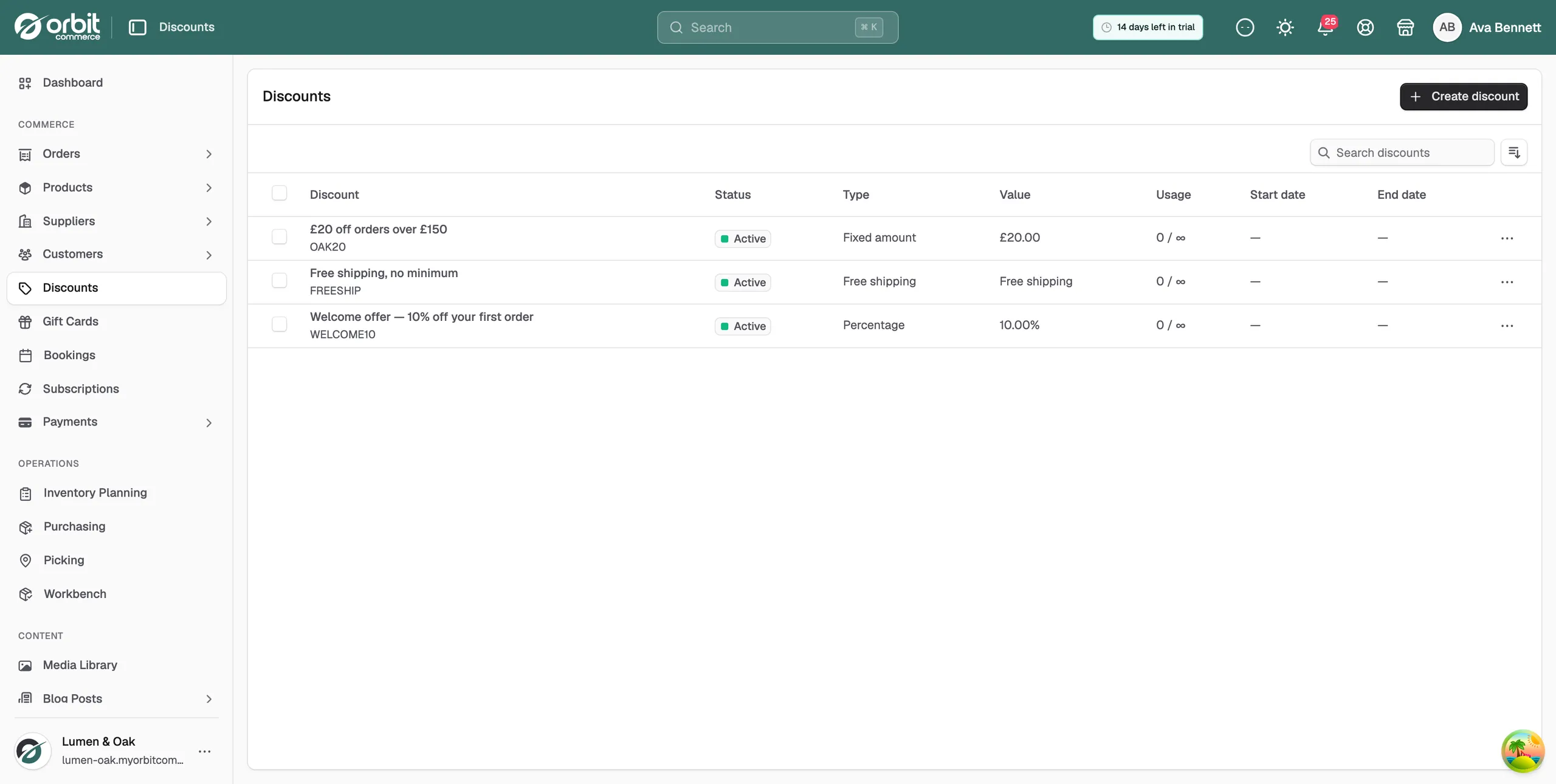
The list shows these columns:
- Discount: the title, with the code under it.
- Status: Active, Inactive, Scheduled or Expired.
- Type: Percentage, Fixed amount, Free shipping or Buy X Get Y.
- Value: the share, the amount, or what the offer gives.
- Usage: uses so far, then the limit.
- Start date and End date: the dates you set, or a dash if you set none.
Give each place you advertise its own code, such as one for email and one for social. The Usage column then tells you which one brought the orders in.
Related guides
Was this helpful?
0 people found this helpful