Which emails your customers receive and when
A map of every email Orbit sends your customer, grouped by account, order, shipping, returns, subscriptions, digital products, gift cards and quotes, with what you can change.
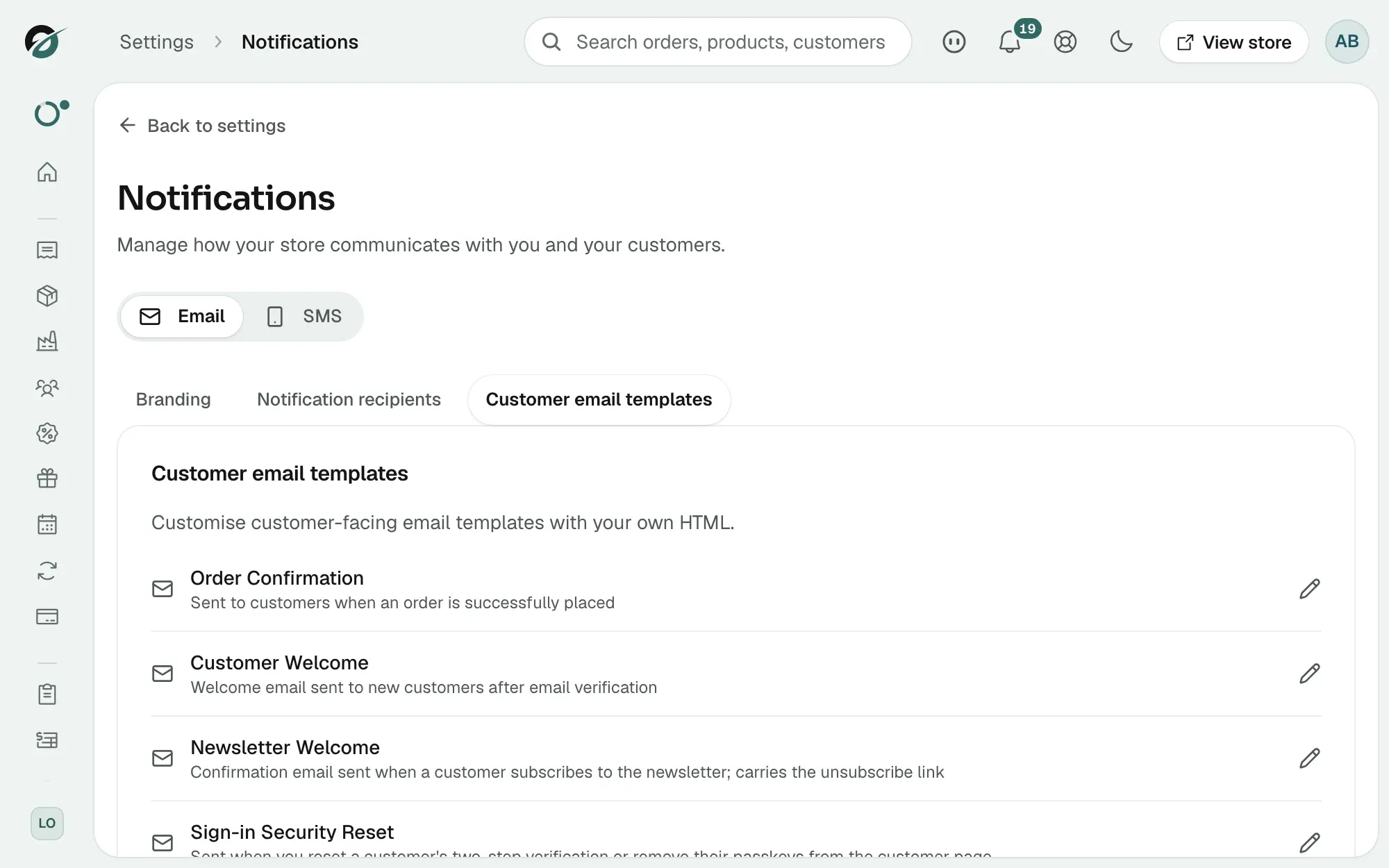
Orbit emails your customer at each step, from the moment they create an account to the day a return is closed. This guide lists those emails, says when each one goes out, and says which ones you can change. Most of them you edit yourself under Settings, then Notifications, on the Customer email templates tab.
Considerations
- An email only goes out if you use the feature behind it. A store with no subscription products never sends a subscription email.
- Editing a template changes what the email says, not whether it is sent.
- The names in bold below are the names on the Customer email templates tab. Where a line says you cannot edit it, Orbit sends that email with its own wording.
- Your sender name, sender address, logo and brand colour apply to all of these emails. You set them on the Branding tab.
Account emails
- A verification email carries the link a new customer uses to confirm their address. You cannot edit this one.
- Customer Welcome: sent to a new customer once they have verified their email.
- A password reset email carries the reset link for a storefront customer. You cannot edit this one.
- Newsletter Welcome: sent when someone subscribes to your newsletter. It carries the unsubscribe link.
- An account invite goes out when you invite a customer to activate their account and choose a password, and when you add a user to a company. You cannot edit this one.
- A company invitation goes out when someone is invited by email to join a company on your store. You cannot edit this one.
- Sign-in Security Reset: sent when you reset a customer's two-step verification or remove their passkeys from the customer page.
- Registration Request Received: sent to a customer when their request for an account is waiting for your approval.
- Registration Request Declined: sent when you decline a registration request.
- Registration Request: Company Review: sent to a company's admin users when someone requests access with that company's account reference.
The verification, password reset, account invite and company invitation emails carry a link that creates or opens a login, so Orbit sends them with its own wording for security. They still use your logo, colours and store name.
Order and payment emails
- Order Confirmation: sent when an order is placed.
- Order Awaiting Payment: sent when the order is created but the payment is still pending.
- Order Confirmed: sent when you confirm the order for processing.
- Order Canceled: sent when an order is cancelled.
- Payment Failed: sent when a payment attempt does not go through.
- Payment Expired: sent when a pending payment runs out of time.
- Payment Canceled: sent when a payment is cancelled.
- Refund Issued: sent when you refund an order.
- Order Invoice: sent with the invoice PDF once an order is paid, and when you email the invoice from the order page.
- Order Link: sent when a customer asks for a new link to view their order from the order status page.
- Abandoned Cart Recovery: sent to a customer who left items in the basket. See Setting up abandoned cart recovery.
Shipping emails
- Order Shipped: sent when the order ships, with the tracking details.
- Tracking Update: sent when the tracking information changes.
- A delivery problem email goes to your customer when a courier reports a problem with the parcel. You cannot edit this one, and you choose whether it is sent. See Keeping customers updated after an order ships.
Return and refund emails
- Return Request Received: sent when your customer submits a return request.
- Return Approved: sent when you approve the request, or when you create a return yourself.
- Return Declined: sent when you decline the request.
- Return Completed: sent when the return is fully processed.
A refund made when you complete a return is stated in the Return Completed email, so Refund Issued is not sent as well. The same goes for a refund made by cancelling an order: Order Canceled states it.
Subscription emails
- Subscription Activated: sent when a new product subscription starts.
- Subscription Renewed: sent when a renewal is paid.
- Subscription Plan Changed: sent when a plan change charges the customer straight away.
- Subscription Payment Failed: sent when a renewal payment fails.
- Subscription Paused: sent when a subscription is paused.
- Subscription Resumed: sent when a paused subscription starts again.
- Subscription Canceled: sent when a subscription is cancelled.
- Subscription Expired: sent when a subscription expires.
Which of these go out is set under Email notifications in your subscription settings. See Changing your subscription settings.
Digital product emails
- Digital Download Ready: sent when the download links for a digital product are ready.
- License Key Delivery: sent when licence keys are assigned after a purchase.
- Download Links Expiring: a reminder that the download links are about to run out.
- Digital File Updated: sent to past buyers when you tell them a new version of a file is available.
Gift card and stock emails
- Gift Card Received: sent to the recipient when you issue a gift card.
- Back in Stock: sent to customers who asked to be told when a product or variant is restocked.
Booking emails
- Booking Confirmed: sent when a service booking is confirmed. It carries a calendar file.
- Booking Changed: sent when a booking moves to a new time, with an updated calendar file.
- Booking Cancelled: sent when the customer or you cancel a booking. It says what was refunded and any cancellation fee.
Quote emails
- Quote Ready: sent when you price a quote request and send it. It carries the quote PDF and the download link.
- Quote Declined: sent when you decline a quote request.
Note: Quote requests are part of the Enterprise plan. On other plans these two emails never go out.
Emails that come to you
Orbit also emails your team as orders and returns come in. You cannot change the wording of these, but you can change who gets them on the Notification recipients tab: new orders, payment confirmations, return requests, security alerts, new customer accounts and registration requests. You also get an email when a courier reports a delivery problem, when a customer asks for a quote, and a daily digest of stock that needs reordering. See Setting up email and SMS notifications.
Where to change these emails
- From your Orbit dashboard, go to Settings.
- Under Insights & tracking, click Notifications.
- Stay on the Email tab, then click Customer email templates.
- Click the row for the email you want. The editor opens with the subject line, the content and a preview.
Tip: Click Send test before you save. It is the only way to see the subject line and the layout the way your customer will.
Related guides
Was this helpful?
0 people found this helpful