Using your dashboard home page
What each block on the Orbit dashboard shows, how to change the date range, and where to go from there.
Dashboard is the first page you see after you log in. It sits at the top of the sidebar. It sums up how your store is doing, shows your latest orders, and points you at the rest of your Orbit dashboard.
What is on the Dashboard
The page is a stack of blocks, in this order.
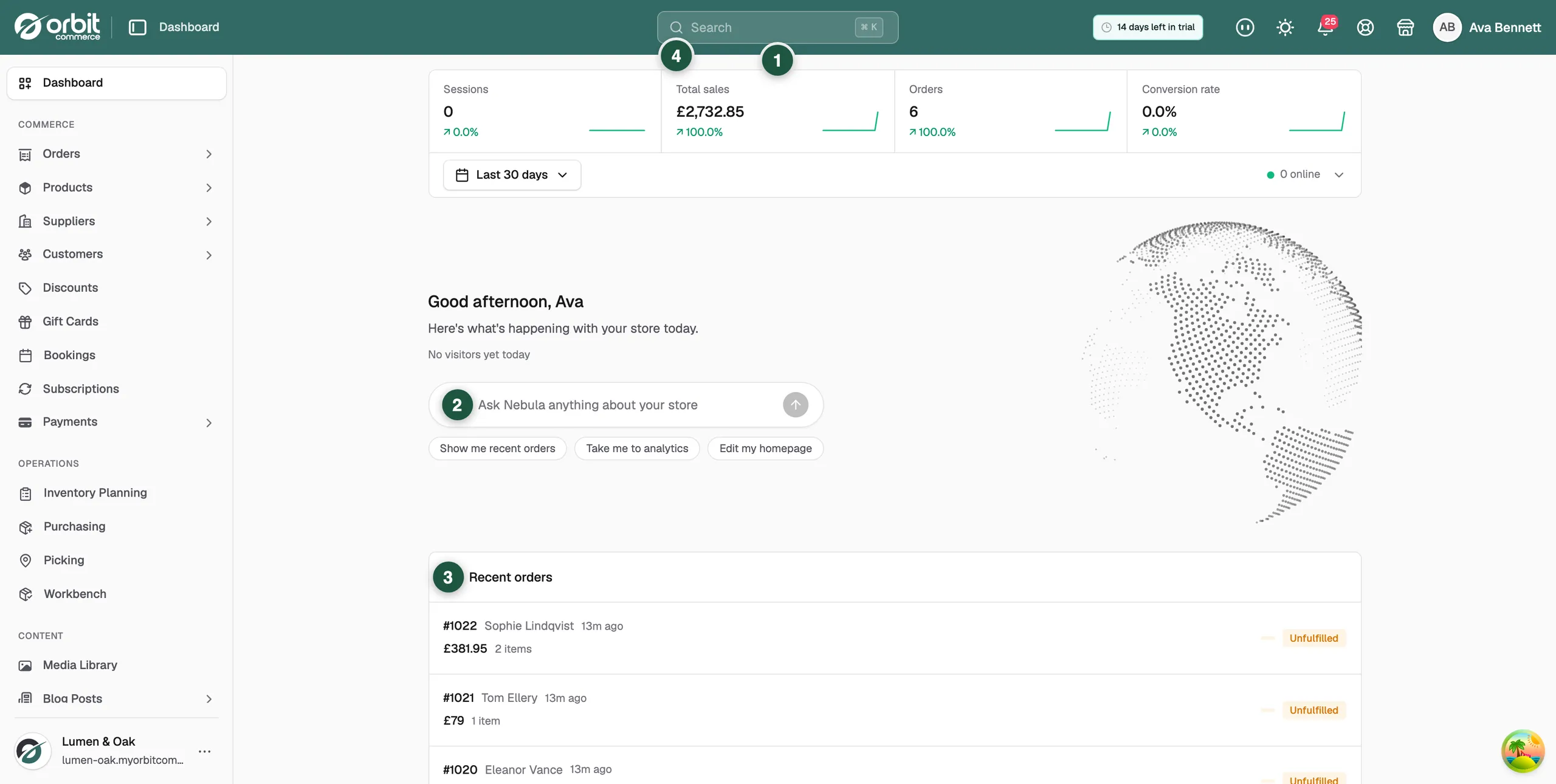
- Sessions, Total sales, Orders and Conversion rate: four cards at the top, with a date button and a live count of people on your store now.
- A greeting, the line Here's what's happening with your store today., and a globe titled Live visitors.
- The Nebula ask bar, where you type a question about your store.
- Get started with Orbit: the setup checklist. It shows on a new store and goes once you finish or dismiss it.
- Recent orders: your latest orders and where each one has got to.
- What's New: what changed in Orbit.
Change the dates your figures cover
- From your Orbit dashboard, go to Dashboard.
- Next to the four cards, click the date button. It reads Last 30 days to start with.
- Pick a range from the list. The four cards redraw for the dates you picked.
Note: The pill beside the date button counts the people on your store right now. It is live, so it ignores the date range.
Ask Nebula a question
- Click the ask bar under the greeting. It reads Ask Nebula anything about your store.
- Type a question, such as how sales compared last week.
- You can also give an instruction, such as taking you to analytics or editing your homepage.
- Press Enter, or click the arrow button at the end of the bar.
Work through the setup checklist
A new store opens with Get started with Orbit. It counts off the jobs that get you selling: Add your first product, Add your business address, Install a theme, Connect a domain, Set up payments, Set up shipping and Launch your store. Click a row to go and do it. Orbit ticks it off for you once it is done. Click Dismiss to hide the card for good.
Keep an eye on recent orders
The Recent orders card lists your newest orders with their status, so you can see new activity without opening the full list. Click View all orders to go there. On a store with no orders yet, the card reads No orders yet.
See what changed in Orbit
The What's New block lists new features, improvements and fixes. Entries you have not read carry a New badge. Click View all updates for the full list.
Where to go next
The Dashboard is a summary. The work happens in the sections below.
- Finding your way around the dashboard: the sidebar, the search box and the store card.
- Working with orders and Managing products: your day to day.
- Managing your customers and Managing payments and payouts.
- Finishing your store setup: the setup wizard a new store starts with.
- Managing your Nebula AI usage and add-ons: what Nebula can do and what it costs.
Was this helpful?
1 people found this helpful