Fixing order emails that do not arrive
Customers not getting order confirmations, or your team missing new order alerts? Check the address, the spam folder, your sender domain and who each alert is sent to.
A customer says their order confirmation never came, or a new order lands and nobody on your team is told. Split the problem in two before you start. Is it customers missing emails, such as confirmations and shipping updates, or is it you and your team missing store alerts? The causes are different.
The email address on the order is wrong
An address mistyped at checkout is the single most common cause.
- From your Orbit dashboard, go to Orders.
- Open the order and read the address on the Customer card.
- If it is wrong, click Edit contact information and correct it.
- Click Email invoice to send the customer their itemised document at the corrected address. See Sending an invoice.
The email went to the customer's spam folder
- Ask the customer to search their spam or junk folder for your shop name.
- Ask them to search their whole mailbox as well. Some providers file a first email from a new sender into another tab or folder.
- Ask them to add your sender address to their contacts, so the next one lands in the inbox.
A first email to a customer who has never heard from you is the one most likely to be filtered.
Your sender domain is not verified
Until your sender domain is verified, your emails still go out. They are sent from Orbit's own address, with your address kept as the reply-to. Customers see them coming from Orbit rather than from you, which makes them easy to miss or to bin.
- From your Orbit dashboard, go to Settings.
- Under Insights & Tracking, click Notifications.
- Choose the Email tab, then Branding.
- Look under Sender Email Address. An orange bar reading Domain yourdomain.com requires DNS verification means it is not done.
- Click anywhere on the orange bar to see the three CNAME records your domain needs, then add them at your DNS provider.
- Click Check verification. DKIM status: reads PENDING until the records are live.
Note: DNS changes can take up to 72 hours. Checking more often does not speed it up. Your DNS provider sets the pace. For the full steps, see Setting up email and SMS notifications.
Nobody is set to receive that store alert
If you or your team are the ones missing emails, check who the alert is addressed to.
- From your Orbit dashboard, go to Settings, then Notifications.
- On the Email tab, click Notification Recipients.
- Find the type you are missing: New Orders, Payment Confirmations, Return Requests or Security Alerts.
- Click Add email next to it and type the address that should get it.
- Click Save recipients.
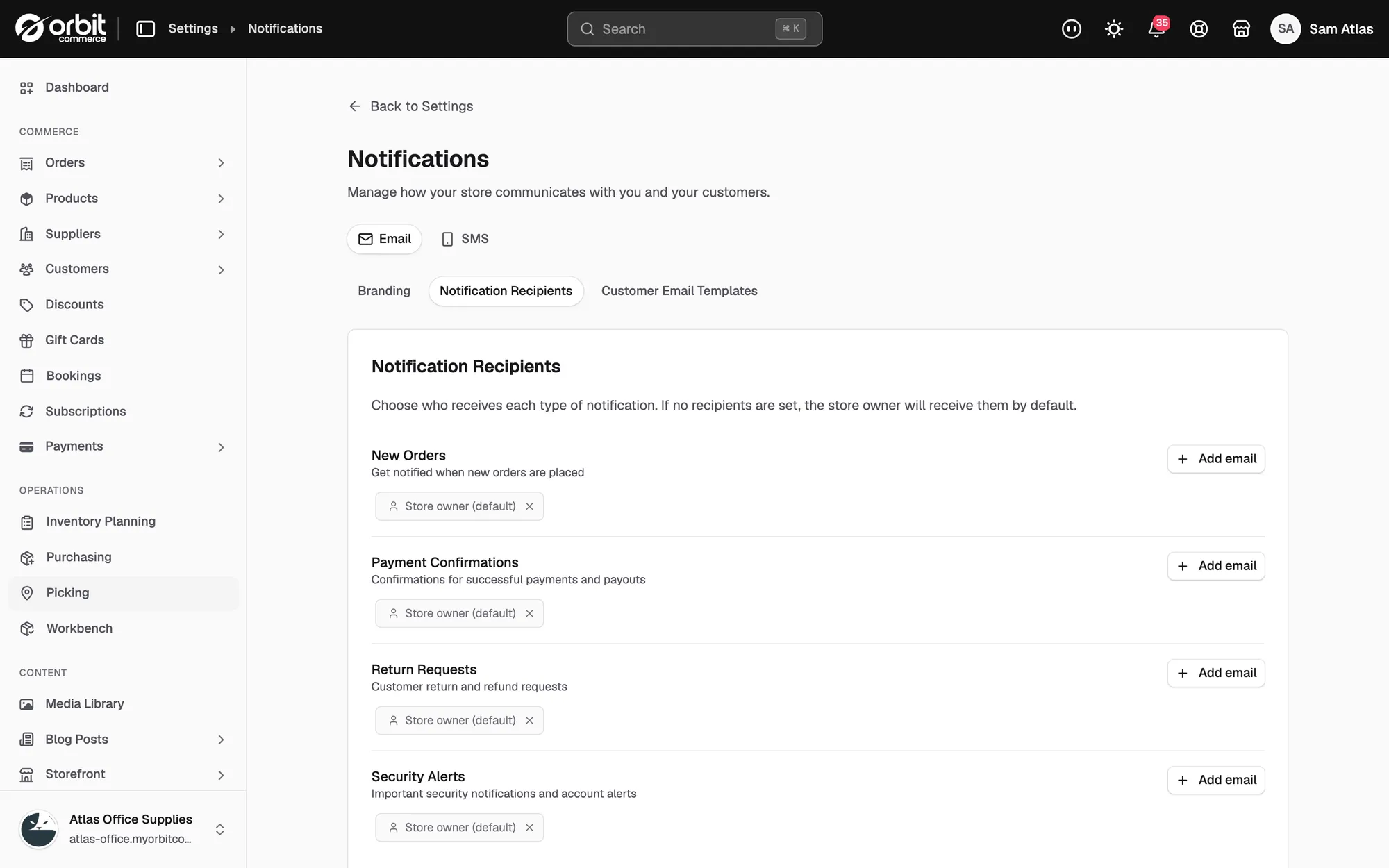
If no recipients are set for a type, the store owner receives it and nobody else does. A team member's own address is not added on its own.
You were expecting a text message, not an email
Email and text message settings are separate. Text alerts come from the SMS tab on the same page, and they go to the number in Notification Phone Number. Only New Orders and Payment Failures are offered as store alerts there.
Emails to many people are failing at once
One customer missing one email is an address or a spam folder. Many customers missing many emails points at your sending domain rather than at their inboxes. See Fixing emails that land in spam for the checks on your domain.
If it still does not work
Open the order and read its activity timeline. It records what has happened to the order, including the emails sent for it. If an email shows as sent and the customer still has nothing, the problem is delivery, not Orbit.
Contact support with one example order number and the date and time the email should have gone. That pair is what makes a delivery trace quick.
Related guides
Was this helpful?
0 people found this helpful