What changes when you upgrade or downgrade
See which plan includes each feature, what happens to your records when you move down a plan, and the staff account and storage limits on Solo, Team, Pro and Enterprise.
Orbit has four plans: Solo, Team, Pro and Enterprise. Most of what you use every day is on every plan, but a few features only come with a higher plan, and every plan has its own limit on staff accounts and storage. This guide lists which plan includes what, and what happens to each feature and its records if you move down a plan.
Considerations
- An upgrade starts as soon as the payment goes through. A downgrade waits until your current billing period ends.
- A downgrade does not delete anything. Records made by a plan-only feature stay in your store, and you get them back when you upgrade again.
- Every plan has a 14-day trial.
- To move between plans, see Understanding and changing your plan.
What each plan includes
| Feature | Plans that include it |
|---|---|
| Online store, Advanced web builder, Mobile responsive themes, SSL certificate | Solo, Team, Pro, Enterprise |
| Unlimited products and unlimited bandwidth | Solo, Team, Pro, Enterprise |
| Abandoned cart recovery | Solo, Team, Pro, Enterprise |
| Shipping labels | Solo, Team, Pro, Enterprise |
| Professional reports | Pro, Enterprise |
| B2B (companies, company users, per-company price lists) | Enterprise |
| Quotes (request a quote, merchant pricing, quote documents, accept and pay) | Enterprise |
| Checkout customisation | Enterprise |
| Priority hosting | Enterprise |
| Page visibility rules (restrict a page, category or brand to signed-in customers or customer tags) | Enterprise |
| Inventory planning, Purchase orders, Bins & picking, Fulfilment workbench | Enterprise |
| Dedicated Account Manager | Enterprise |
Card rates also change with the plan. Those are listed in Choosing a plan.
What a downgrade does to each feature
Plan-only features behave in one of four ways once your new plan starts.
Locked until you upgrade again
These close completely. You cannot open the pages or read the records while you are on a lower plan. The records stay in your store and come back the moment you upgrade.
- Inventory planning: reorder points, safety stock, the needs-reorder view and the daily digest.
- Purchase orders: replenishment suppliers, purchase orders, receiving and the Stocky import.
- Bins & picking: bin locations, pick lists and cycle counts.
- Fulfilment workbench: batch pick, pack, verify and ship.
- Quotes: quote requests, priced quotes, quote documents and accept and pay.
A locked feature answers with the message Your plan does not include the "quotes" feature, naming whichever feature you opened. It points at the plan, not at a problem with your store.
Read only
B2B stays open to read. You can still look at your companies, their contacts, your invitations, your price lists and your B2B invoices. You cannot add to them or change them until you upgrade.
Off, with nothing to keep
- Checkout customisation: you can no longer edit the checkout page.
- Priority hosting: the higher-resource hosting is no longer included.
- Professional reports: included on Pro and Enterprise only.
Rules that stop applying
Page visibility rules are not locked. They stop being applied. A page, category or brand you had restricted becomes visible to everyone again, including people who are not signed in. The rule stays saved and starts working again as soon as you upgrade. See Restricting who can see a page, category or brand.
Warning: Before a downgrade from Enterprise takes effect, check every page, category and brand you have restricted. If the content is private, unpublish it, because the visibility rule will no longer hold it back.
Everything on every plan keeps working, including abandoned cart recovery, shipping labels, your products and your bandwidth.
Seats, storage and products
| Plan | Price a month | Price a year | Staff accounts | Storage | Products |
|---|---|---|---|---|---|
| Solo | £25 | £225 | 1 | 100 GB | Unlimited |
| Team | £85 | £765 | 10 | 300 GB | Unlimited |
| Pro | £249 | £2,241 | 40 | 500 GB | Unlimited |
| Enterprise | £999 | £8,991 | Unlimited | 1 TB | Unlimited |
- Staff accounts: the count includes your team members and any invitations you have sent that nobody has accepted yet.
- Storage: the space your images, files and other assets take up.
- Products and Bandwidth: unlimited on all four plans.
To see where you stand, go to Settings, then Plan & billing, and read the Usage & limits card. It shows a bar for each limit, an Approaching limit badge as you near one, and a Limit reached badge once you are at it.
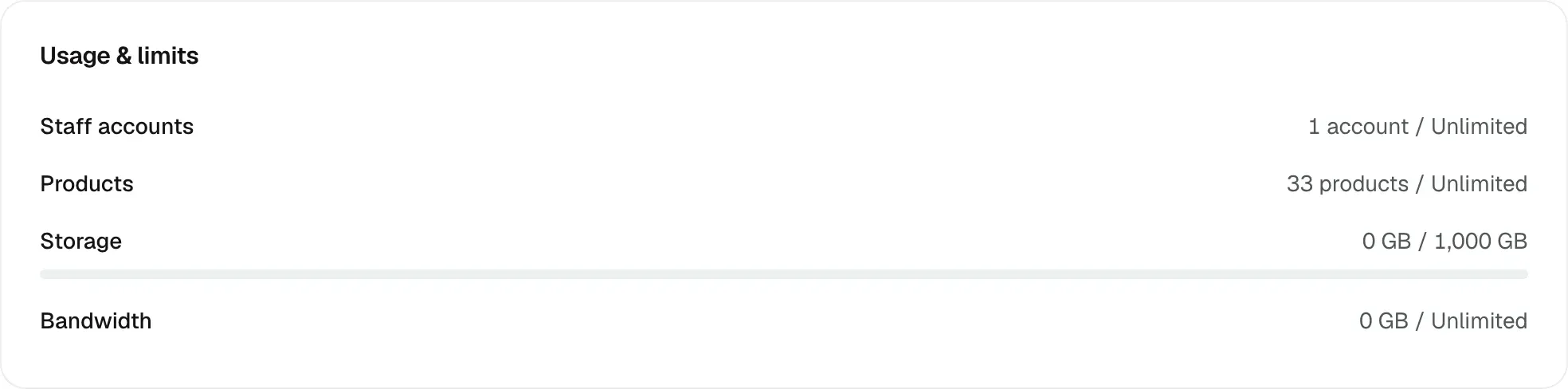
A limit is checked at the point you add something. If a downgrade leaves you over a limit, you cannot add another staff account or upload more files until you are back under it.
When a change takes effect
- Upgrade: the new features open as soon as the payment goes through.
- Downgrade: your current plan runs to the end of the period you have paid for. Until then the Current plan card shows a Scheduled plan downgrade panel with the date and the plan you are moving to.
- Failed payment: your plan status goes to Past due. Plan features stay on for seven days after the period end, which gives you time to fix the card.
- Cancelled, expired or paused: plan-only features lock in the same way as a downgrade, and your records stay in place.
Tip: A plan change can take up to 30 seconds to reach every part of your store. If a feature still looks locked straight after an upgrade, wait half a minute and reload the page.
Orbit support can also switch a single feature on or off for one store, on top of what your plan includes. Ask support if you need one feature and not a whole plan.
Related guides
Was this helpful?
0 people found this helpful