Fixing a plugin that does not show
A plugin you installed is missing from the menu, or it is there and does nothing. Check its status badge, where it sits in the menu, and whether its subscription is running.
You installed a plugin and cannot find it, or you can find it and it does nothing. Both usually come down to the state the plugin is in rather than a fault. Start on the Plugins page and work down the list.
Check the plugin's status
- From your Orbit dashboard, go to Plugins.
- Look at the My Plugins list. Every plugin you have installed is there, with a status badge on its row.
- Read the badge. Active means the plugin is switched on. Installed means it is switched off.
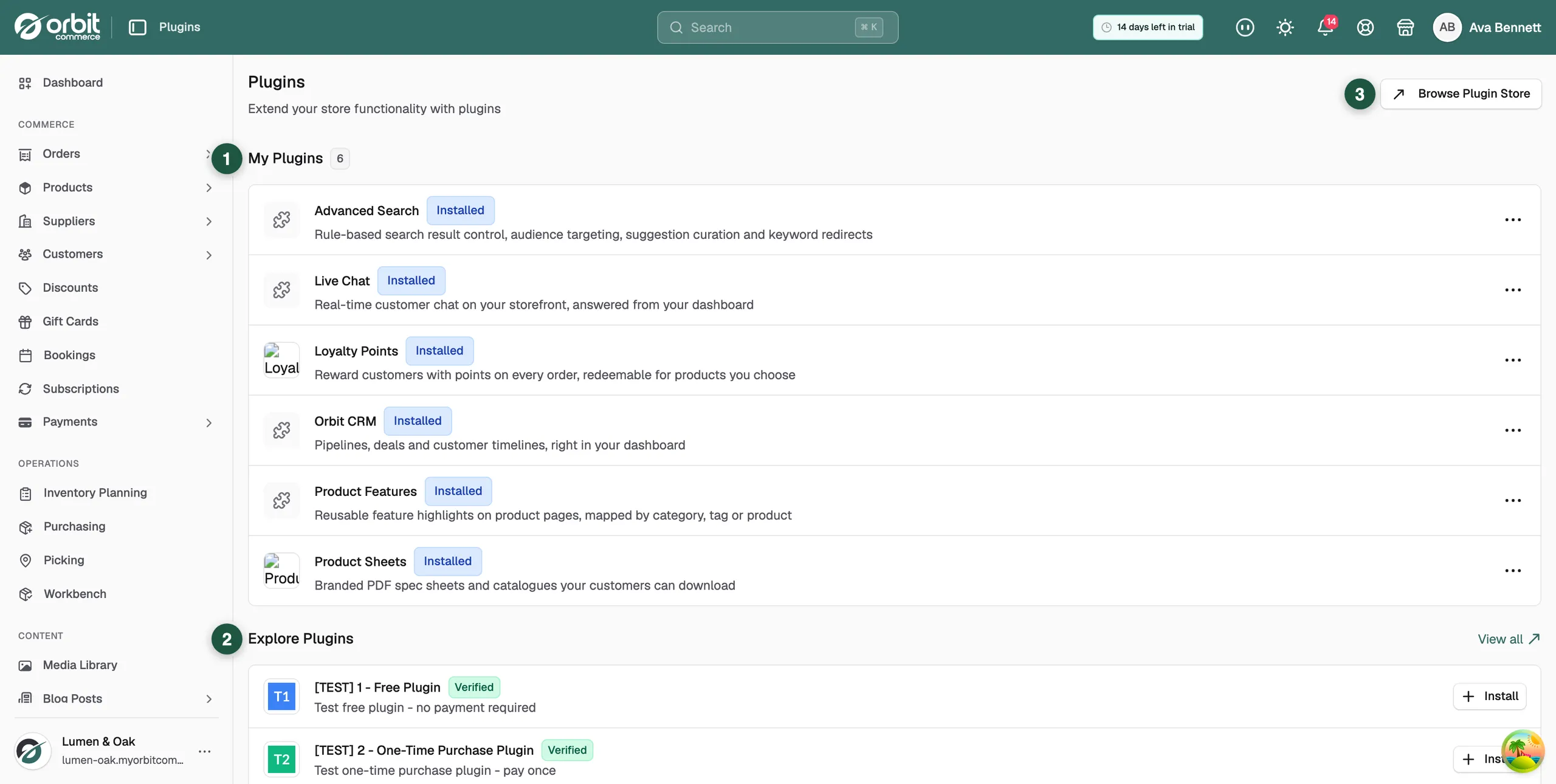
The plugin is installed but not active
A deactivated plugin keeps its settings but loses its Open button and its row in the left-hand menu. That is what "installed but missing" nearly always means.
- Under My Plugins, open the dots menu at the right of the plugin's row.
- Click Activate. The message Plugin activated appears.
- The badge changes to Active, the Open button comes back and the plugin returns to the left-hand menu.
You are looking in the wrong part of the menu
- Active plugins get their own section at the bottom of the left-hand menu, called Installed Plugins. They are not mixed in with Commerce or Settings.
- The menu row can use a shorter name than the plugin's store name. Calculator Builder appears as Calculators, for example.
- If the menu is tucked away to icons, click the button next to the Orbit logo to open it out again.
- Refresh your browser. The menu builds its plugin rows when the page loads, so one installed in another tab may not be there yet.
The install never finished
If the plugin is not in My Plugins at all, it was never installed. An empty list shows the message You haven't installed any plugins yet.
- Under Explore Plugins, find the plugin and click Install, or click View all to open the Plugin Store.
- Read the details page, then click the button at the bottom to install.
- Wait for the message Plugin installed successfully! at the bottom right. The plugin's own page then opens.
The trial or the subscription has ended
Paid plugins run on a free trial and then on a subscription, billed through your Orbit account.
- Under My Plugins, open the dots menu on the plugin's row.
- If it offers Resume subscription, the subscription is not running. Click it to start the plugin again.
- Click View Details to see the plugin's plans and what each one costs.
Warning: Do not uninstall a plugin to fix it. Uninstalling can lose the data it stored. Use Deactivate and then Activate instead.
A team member cannot see it
Some plugins only appear to team members whose role gives them the right access. If you can see the plugin and a colleague cannot, check their role under Settings, then Team. See Setting what a team member can do.
The plugin opens but its page does not load
Plugins made by partners run as embedded apps inside your dashboard. A page that never finishes loading points at the partner's own service rather than at your store. Check the maker's status page, wait a few minutes and try again.
If it still does not work
Contact support with the plugin's name, the status badge on its row, and when the problem started. For a plugin made by a partner, say who the maker is. Their name sits under the plugin name on its details page.
Related guides
Was this helpful?
0 people found this helpful