Setting SEO titles and descriptions per page
Edit the search engine listing for each page, product, category and blog post, and learn what to put in the title and meta description.
Every page, product, category and blog post in your store has its own search engine listing: a page title and a meta description. These decide what shows in a search result and whether anyone clicks it. Store-wide defaults live under Settings, then SEO, but the wins are per page.
Considerations
- The page title can be up to 70 characters. Search engines show about 60 before cutting it off.
- The meta description can be up to 160 characters. Aim for 120 to 160.
- Each editor shows a Preview of how the listing will look in a search result.
- Pages without their own image use the store's social sharing image when shared. You set that under Storefront, then Preferences.
Edit a page's listing
- From your Orbit dashboard, go to Storefront, then Pages.
- Open the page.
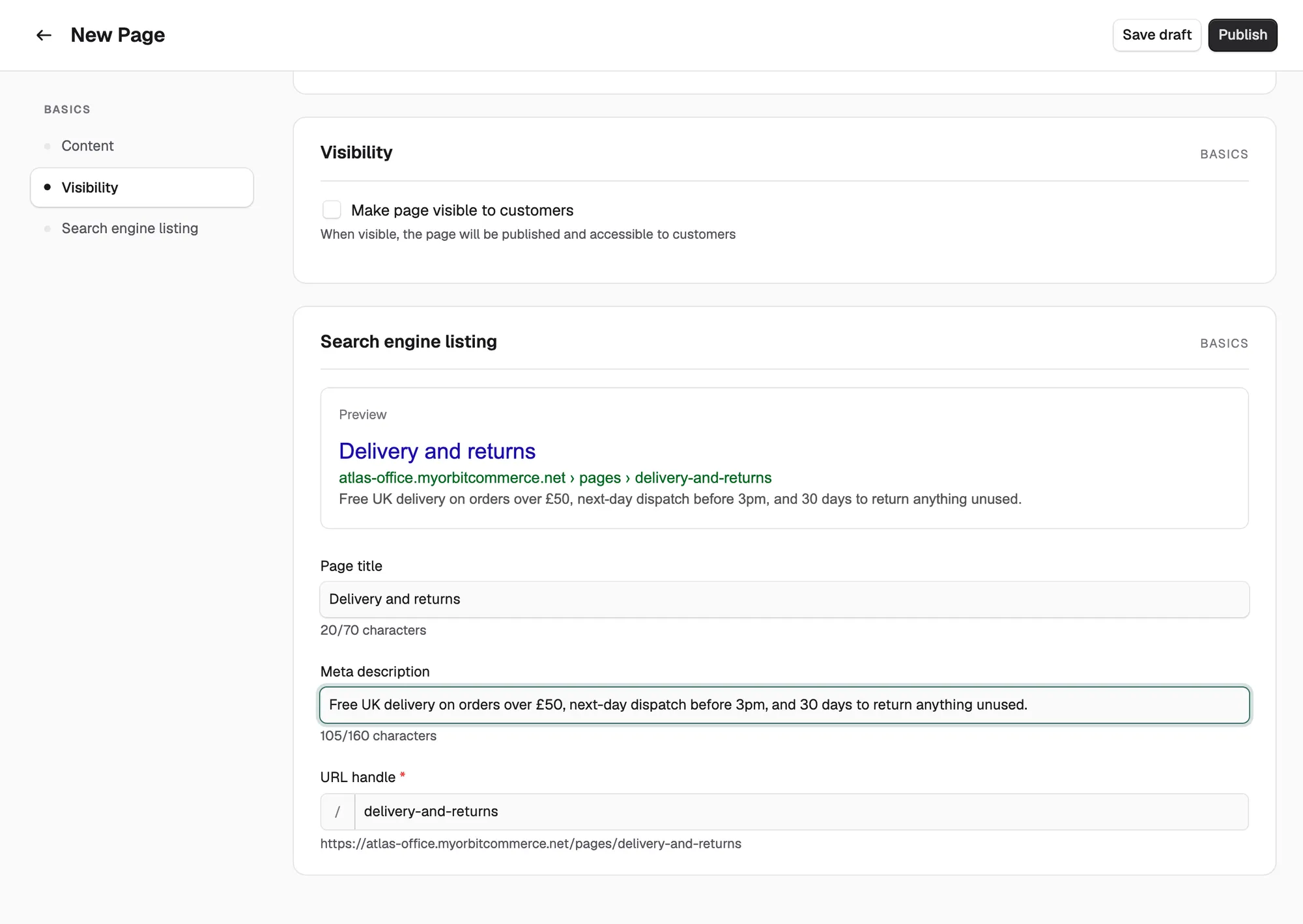
- In the menu on the left, click Search engine listing.
- Type a Page title and a Meta description. The character count updates as you type.
- Check the URL handle. This is the last part of the page's web address.
- Click Save.
Edit a product's listing
- From your Orbit dashboard, go to Products and open the product.
- In the menu on the left, click Search engine listing.
- Type a Page title and a Meta description. If you leave them blank, Orbit uses the product name and short description.
- Check the URL and handle.
- Click Save.
Note: The same section holds Hide from search results. This hides the product from your storefront's own search box, not from Google.
Edit a category or blog post listing
Categories and blog posts have the same Search engine listing section in their editors, with Page title, Meta description and URL and handle. Open the item, fill in the fields, and click Save.
Write listings that earn clicks
- Page title: lead with the thing, not your brand. "Aalto Oak Lounge Chair in Wool and Solid Oak" beats "Lumen and Oak | Products | Chairs | Aalto".
- Meta description: one or two sentences that answer "why this page". Include the price hook or what makes it different.
- URL handle: short, lower case, words separated by hyphens.
Tip: Never give two pages the same title. Search engines pick one and ignore the rest.
Where to start
Your homepage, top five categories, top ten products and best blog posts bring most of your search traffic. Write those listings first. The rest can use the defaults until they earn attention.
Related guides
Was this helpful?
0 people found this helpful