Setting customs defaults, EORI and IOSS numbers
Set the country of origin, contents type, incoterm and declaration signer Orbit uses on international labels, and add your EORI, IOSS and other tax identifiers.
The International tab under Settings, then Shipping, holds the customs details Orbit sends with every international label: your default country of origin, the contents type, what to do if delivery fails, the default incoterm, the person who signs your declarations, and tax identifiers such as EORI and IOSS. Set them once and every declaration starts filled in.
Considerations
- These settings are only used when you buy a label through Orbit for an order going abroad. Tracking added by hand does not use them.
- Labels bought through Orbit Shipping are always DDU or DAP. A DDP default only applies on your own carrier accounts.
- Every tax identifier needs a type, a value and an issuing country before the page will save.
- Tax identifiers are stored encrypted.
Open the International tab
- From your Orbit dashboard, go to Settings.
- Under Selling, click Shipping.
- Click the International tab. It has two parts, Customs defaults and Tax identifiers, with one Save button for both.
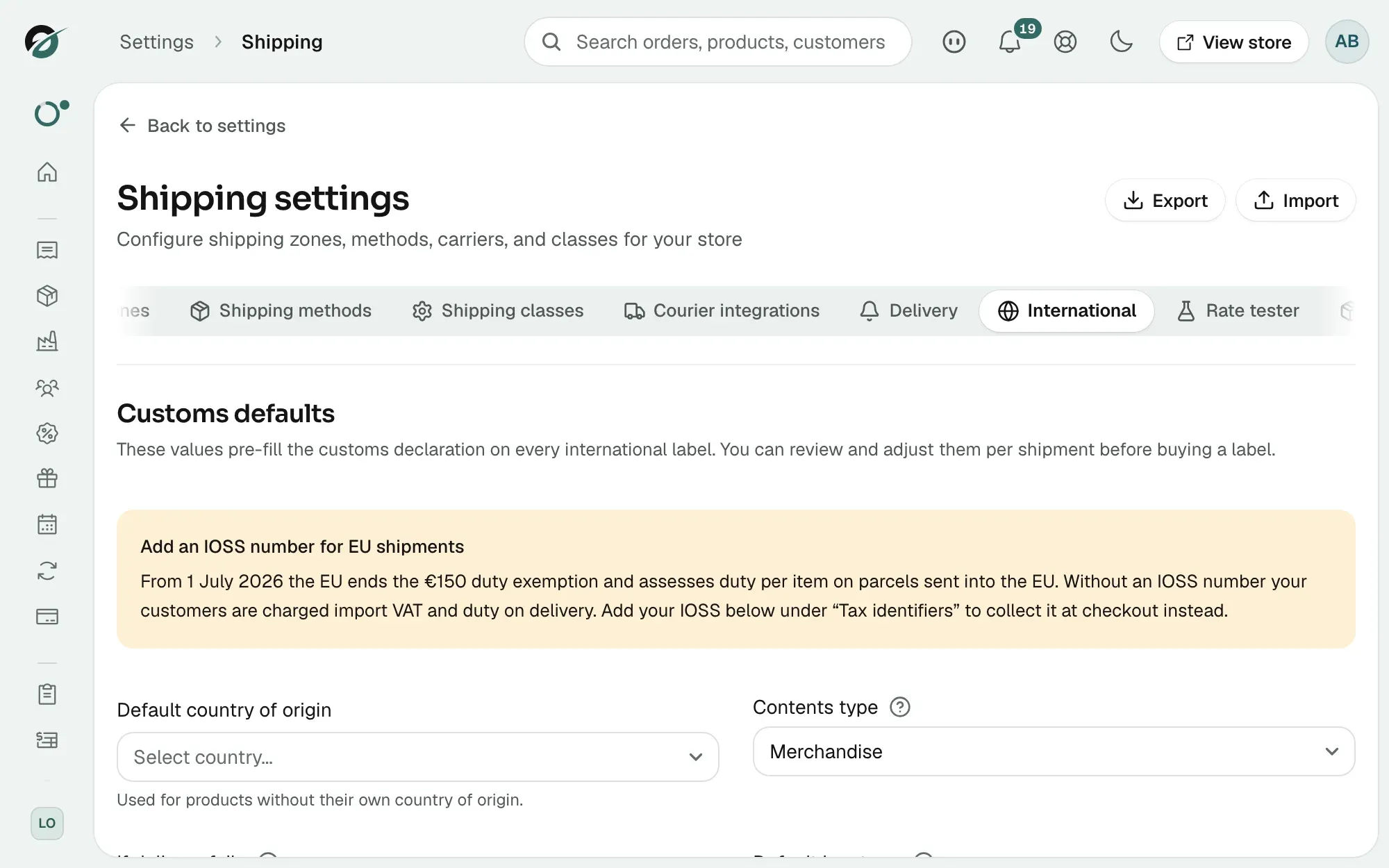
If your store is outside the EU and has no IOSS number saved, an orange notice headed Add an IOSS number for EU shipments sits at the top until you add one.
Set your customs defaults
- Under Default country of origin, pick where your products are usually made. It is used for any product without its own. Leave it on Use store address country to use your store address. That option shows your store's country code, such as (GB).
- Under Contents type, pick what your parcels hold.
- Under If delivery fails, pick Return to sender or Treat as abandoned. A return can cost you extra. An abandoned parcel is destroyed.
- Under Default incoterm, pick who pays import duties and taxes. See the list below.
- Under Declaration signer, type the name of the person who certifies your declarations, for example Jane Doe. Use a real person, not a company name. It is printed on the CN22 or CN23 form.
- Click Save. The message International shipping settings saved appears.
The contents types are Merchandise, Gift, Sample, Documents, Returned goods and Other. New stores start on Merchandise.
Warning: Do not declare sales as gifts to avoid import charges. Customs can hold or seize the parcel, and you can be fined.
The incoterms:
- DDU: the recipient pays import duties on delivery. This is the default.
- DAP: delivered at place. The recipient pays duties.
- DDP: you pay import duties through your own carrier account. Not available on Orbit Shipping.
- EXW: ex works.
- FOB: free on board.
- CIF: cost, insurance and freight.
With DDU or DAP the carrier collects duties from your customer before handing over the parcel, and some customers refuse. With DDP the customer pays nothing on arrival, but you carry the cost, so price your delivery to cover it. Your own carrier accounts can override this default from Edit connection on the Courier integrations tab. See Connecting carriers and testing rates.
Add your EORI, IOSS and other tax identifiers
These registrations travel with every international label. They keep parcels moving and stop your customer being charged tax twice. Until you add one, the section reads No tax identifiers configured.
- Under Tax identifiers, click Add identifier. A new row appears.
- Under Type, pick the identifier. See the list below.
- Under Value, type the number, for example GB987654312000.
- Under Issuing country, pick the country that issued it, such as United Kingdom for a GB EORI.
- Click Add identifier for each one you hold. To remove a row, click the bin icon.
- Click Save.
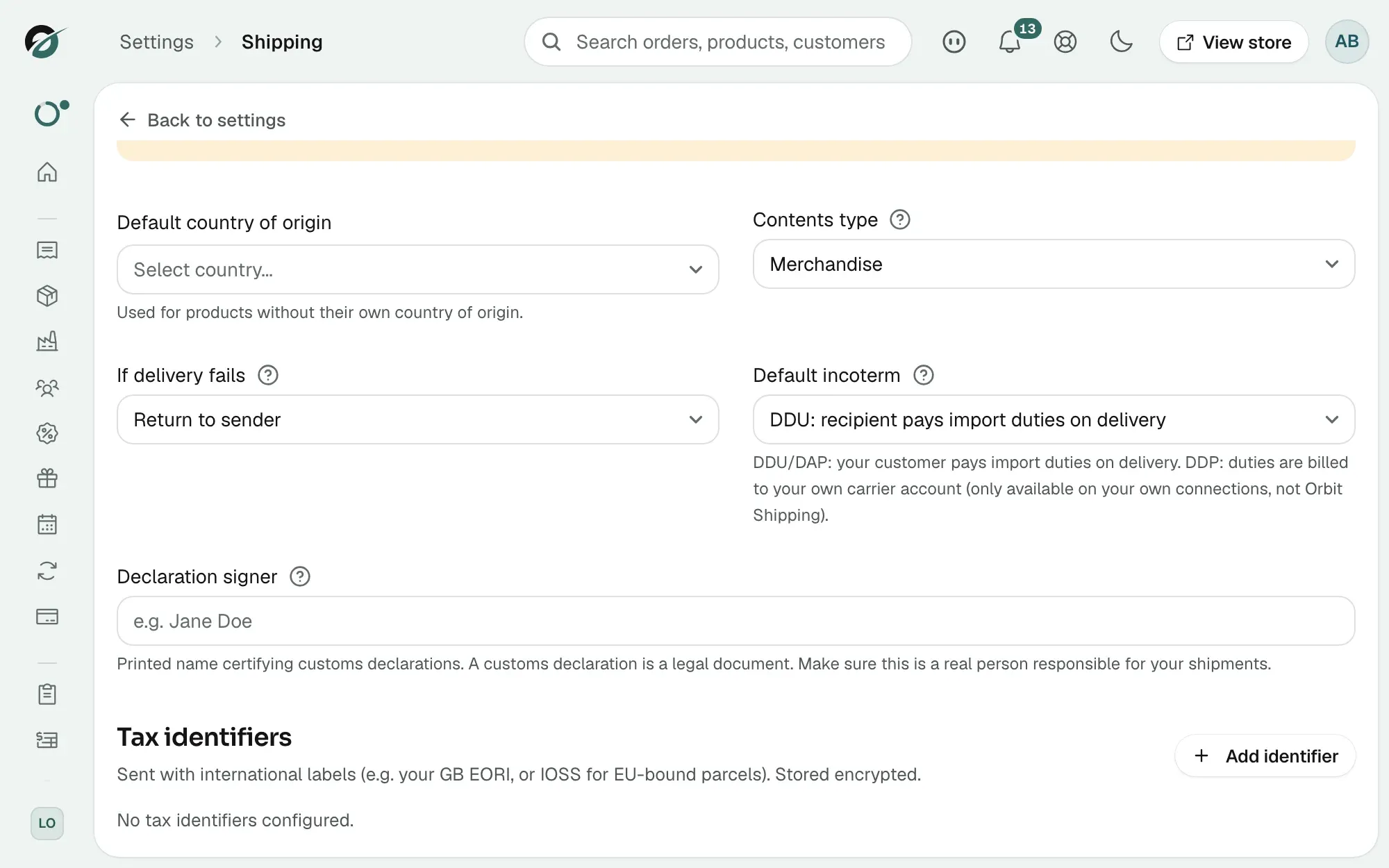
The identifier types:
- EORI: for customs declarations in GB and the EU. Most declarations need one.
- IOSS: for EU import VAT on consignments of €150 or less. It shows VAT was collected at your checkout.
- VOEC: Norway VAT on e-commerce.
- VAT registration number: proves your tax registration in a country.
- OSS: the EU one-stop shop.
- UKIMS: the UK internal market scheme.
The EU change on 1 July 2026
From 1 July 2026 the EU ends the €150 duty exemption and charges duty per item on parcels sent into the EU. Without an IOSS number, your customers pay import VAT and duty on arrival. With one on the label, customs treat VAT as collected at your checkout, so the customer is not charged again. Orbit reminds you in two places until you add one: the notice on this tab, and a notice in the fulfil panel on every order going into the EU. Neither stops you buying a label.
IOSS is only for parcels sent into the EU from outside it. A store based in the EU does not need one, and uses OSS instead. To charge EU VAT at checkout, set up EU tax zones. See Setting up taxes.
Where the defaults are used
When you fulfil an international order with Use courier integration on, the panel shows a declaration for each item. Your default country of origin fills in for products without one, and the incoterm line shows which term applies. The contents type, what to do if delivery fails, the signer and your tax identifiers are sent with the label without being shown. See Completing a customs declaration.
Related guides
Was this helpful?
0 people found this helpful