Products | Taxonomy vs Categories
What the Product Taxonomy is (the standard Google tree), why it matters for feeds and AI shopping, how it differs from your store categories, plus brands, custom types and tags.
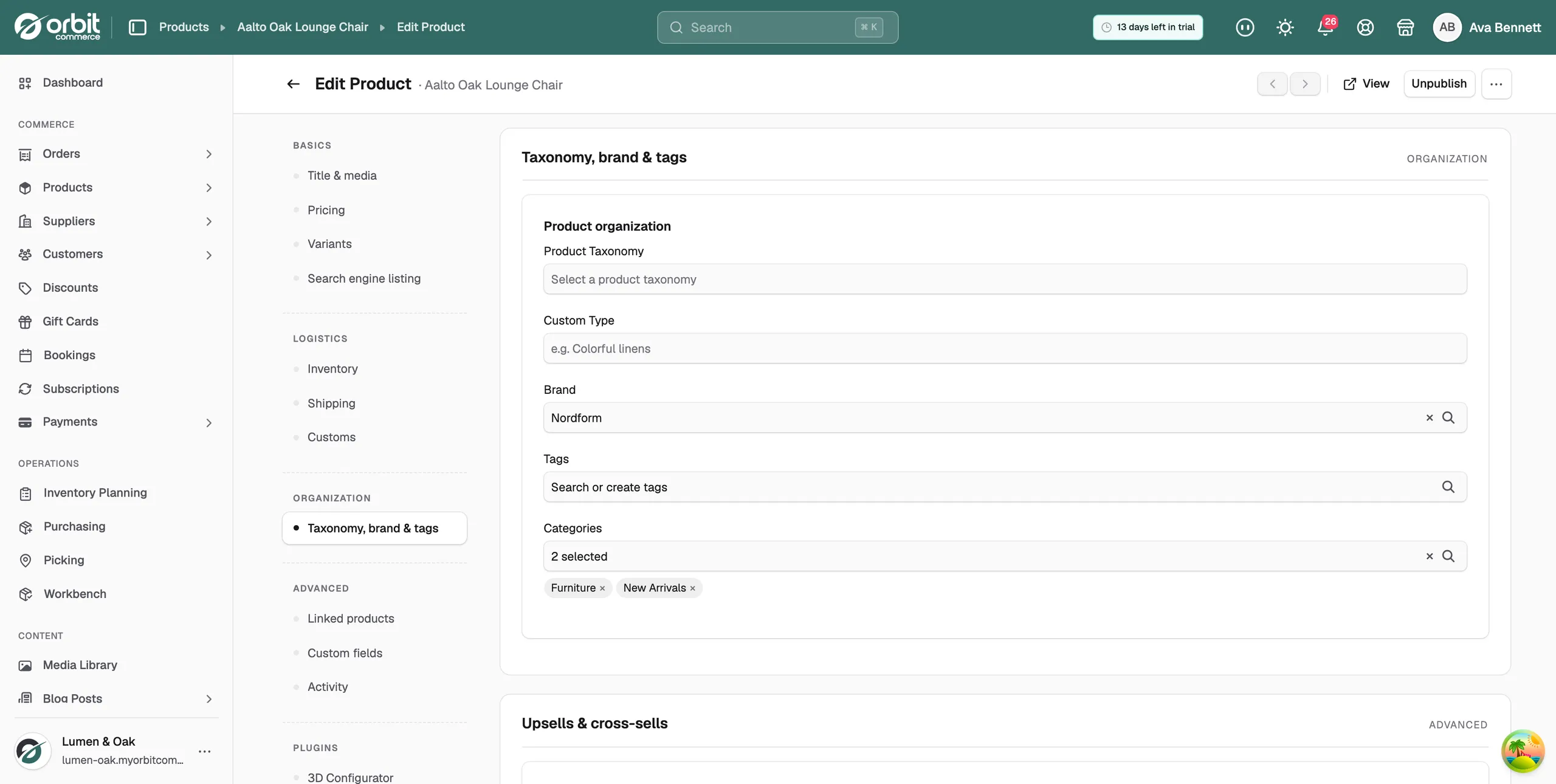
Every product in your store has a Product Taxonomy field, found under Taxonomy, brand & tags on the product page. This guide explains what it is, why it matters, how to pick the right one, and how it differs from the other fields in that section.
What is a product taxonomy?
A product taxonomy is a standardised category tree that tells sales channels, search engines and AI shopping tools exactly what your product is. Rather than every store inventing its own labels, everyone uses the same shared tree, so a "height adjustable desk" means the same thing to your store, to Google and to an AI shopping assistant.
Orbit uses the Google Product Taxonomy, the industry standard. It has 21 top level branches and around 5,600 more specific categories nested underneath, from broad ("Furniture") down to very precise ("Furniture > Office Furniture > Desks").
Good to know: the full tree is already built into Orbit. There is nothing to import or set up: you simply pick the category that fits each product.
Why it matters
Setting a taxonomy is optional, but a good one works quietly in your favour:
- Shopping feeds. Google Shopping, Bing and other channels use it to place your product in front of the right shoppers. Feeds with accurate categories perform better and are less likely to be rejected.
- AI shopping tools. Assistants that shop on a customer's behalf rely on standardised categories to find suitable products.
- Better discovery. The more precisely a channel understands your product, the more relevant the searches it appears in.
Taxonomy vs your store's categories
This is the most common point of confusion, because both sound like "categories". They are two different things doing two different jobs:
| Product Taxonomy | Your store categories | |
|---|---|---|
| Who sees it | Sales channels, search engines, AI tools | Your customers |
| Where it comes from | The standard Google Product Taxonomy tree, built in | You create and name them yourself |
| What it does | Tells the outside world what the product is | Organises how customers browse your storefront |
| Example | Furniture > Office Furniture > Desks | "Home Office Sale", "Best Sellers" |
What other platforms call collections, Orbit calls categories: the merchandising groups your customers browse. A product can sit in as many as you like. You will usually set both: a taxonomy for the feeds, and your own categories for the shop floor.
How to choose one
- On the product page, open Taxonomy, brand & tags and click the Product Taxonomy box.
- Search first: type a keyword such as "desk" and pick from the matches.
- Or browse: use the arrows to drill down through the tree, level by level.
- Be as specific as you can. "Furniture > Office Furniture > Desks" will always beat plain "Furniture" in feeds. If no exact match exists, choose the nearest specific parent rather than something loosely related.
Tip: selling many similar products? Set the taxonomy on one, then use bulk edit from the product list to apply it across the rest in one go. And set it before installing feed plugins: feeds reject or misfile products without it.
The 21 top level branches
Animals & Pet Supplies · Arts & Entertainment · Baby & Toddler · Business & Industrial · Cameras & Optics · Clothing & Accessories · Electronics · Food, Beverages & Tobacco · Furniture · Hardware · Health & Beauty · Home & Garden · Luggage & Bags · Mature · Media · Office Supplies · Religious & Ceremonial · Software · Sporting Goods · Toys & Games · Vehicles & Parts
Each branch opens into progressively more specific levels. Search inside the picker is usually the fastest way in.
Want to browse everything? The complete list of all 5,600 or so categories is published by Google: view the full Google Product Taxonomy list. It is the exact same list you will find in the picker, in the same UK English wording.
The other fields in this section
Brand: who makes it. Brands get their own listing pages and filters, and product feeds use them. One brand per product.
Custom type: a free text grouping of your own ("Colourful linens", "Winter 2026"). Use it for groupings that do not deserve a public category; reporting and rules can target custom types.
Tags: ad hoc labels that power automation. Advanced Search rules, discount scopes and Product Features sets can all target a tag. Tags are invisible to customers unless you surface them.
Rule of thumb: taxonomy is what it is, category is where you sell it, brand is who makes it, tags are what you automate on.
Frequently asked questions
Do I have to set one?
No, products sell without it. But if you use shopping feeds or want your products visible to AI shopping tools, it is one of the highest value fields you can fill in.
Can I import my own taxonomy?
No, and you should not need to. The tree is the shared industry standard; your own groupings belong in your store categories instead, which you can shape however you like.
What if nothing fits exactly?
Pick the most specific category that honestly describes the product, even if the name is not word for word what you would call it. A close, specific match beats a vague one.
Does changing it later cause problems?
No. Feeds simply pick up the new category on their next sync.
Was this helpful?
0 people found this helpful