Adding a tooltip
Add a Tooltip element to explain something in a bubble. Choose an icon or a text trigger, type the note, and set which side the bubble opens on.
The Tooltip element shows a small icon or a short label on the page. A bubble with your explanation appears when your customer hovers over it, taps it or reaches it with the keyboard. Use it for a short note, such as what a size code means or when an order is dispatched.
Considerations
- The bubble stays hidden until someone hovers over the trigger, taps it or moves to it with the keyboard.
- While the element is selected in the page builder, the bubble is held open so you can style it.
- The bubble holds plain text. You cannot put a link, an image or another element inside it.
Add the element
- Open the page in the page builder.
- In the toolbox on the far left, click Elements.
- Find Tooltip in the Basic group, or search for it.
- Drag it onto the canvas and drop it where you want it. The settings panel opens on Editing Tooltip.
Set the trigger and the text
- With the element selected, open the Content tab.
- Under Trigger, set Trigger Type to Icon or Text.
- For an icon, search the icon picker and click the one you want. For text, type the words in Label.
- Under Tooltip Text, type your explanation in Content. The bubble on the canvas updates as you type.
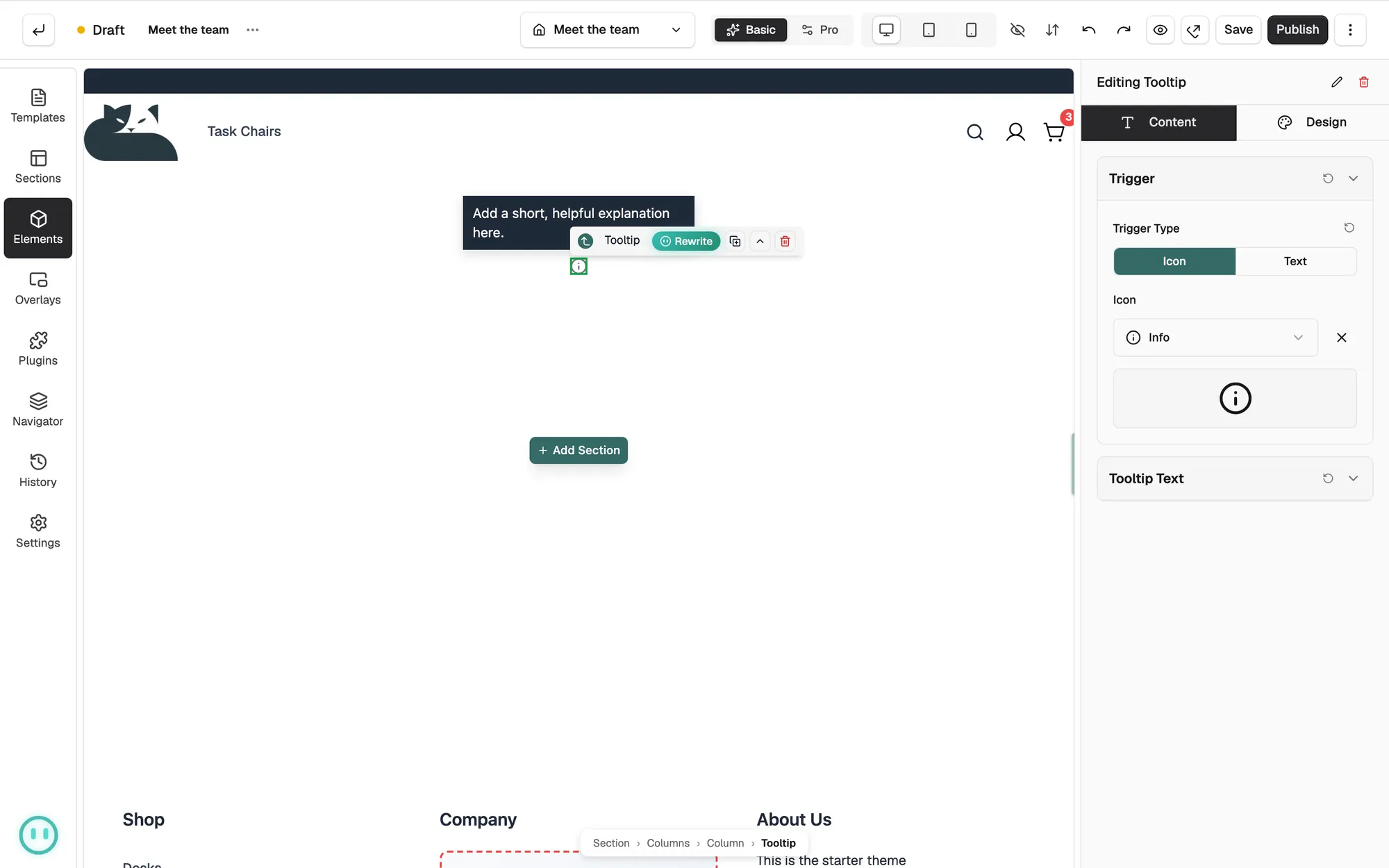
Content settings
- Trigger Type: whether the trigger is an Icon or a Text label. An icon is used by default.
- Icon: the icon your customer hovers over, chosen from the icon library. An information icon is used by default.
- Label: the words used as the trigger when Trigger Type is Text.
- Content: the text inside the bubble.
Design settings
Open the Design tab to change the look. The groups are Position, Trigger Icon, Bubble, Typography, Border and Spacing. Tooltip Position sets which side of the trigger the bubble opens on, and Show arrow turns the small pointer on or off. Trigger Icon only appears when the trigger is an icon.
Related guides
Was this helpful?
0 people found this helpful