Using bulk actions on orders
Tick orders on the Orders list to print packing slips, mark them paid or fulfilled, cancel or archive them, and send them to a pick list or batch.
3 min read4viewsUpdated 24 September 2026Orbit Commerce
You can act on many orders at once from the Orders list. Tick the orders you want and a bulk action bar replaces the table header. One click then runs the action on every ticked order.
Considerations
- The tick box in the table header selects every order on the page in front of you. A page holds up to 50 orders.
- Issue refund works on one order at a time. Tick more than one and Orbit asks you to pick a single order.
- Mark as paid and Mark as unpaid ask you to confirm first. The customer may be notified and you cannot undo it from the list.
- Print pick list and Create fulfilment batch are Enterprise features. On other plans the buttons are not shown.
Select orders
- From your Orbit dashboard, go to Orders.
- Narrow the list first if you can. For example, click Unfulfilled above the table to see only orders still to pack.
- Tick the box next to each order you want. To select every order on the page, tick the box in the table header.
- The header row changes to the bulk action bar. It shows how many you picked, for example 3 selected, with the actions on the right.
- To start again, click Unselect all.
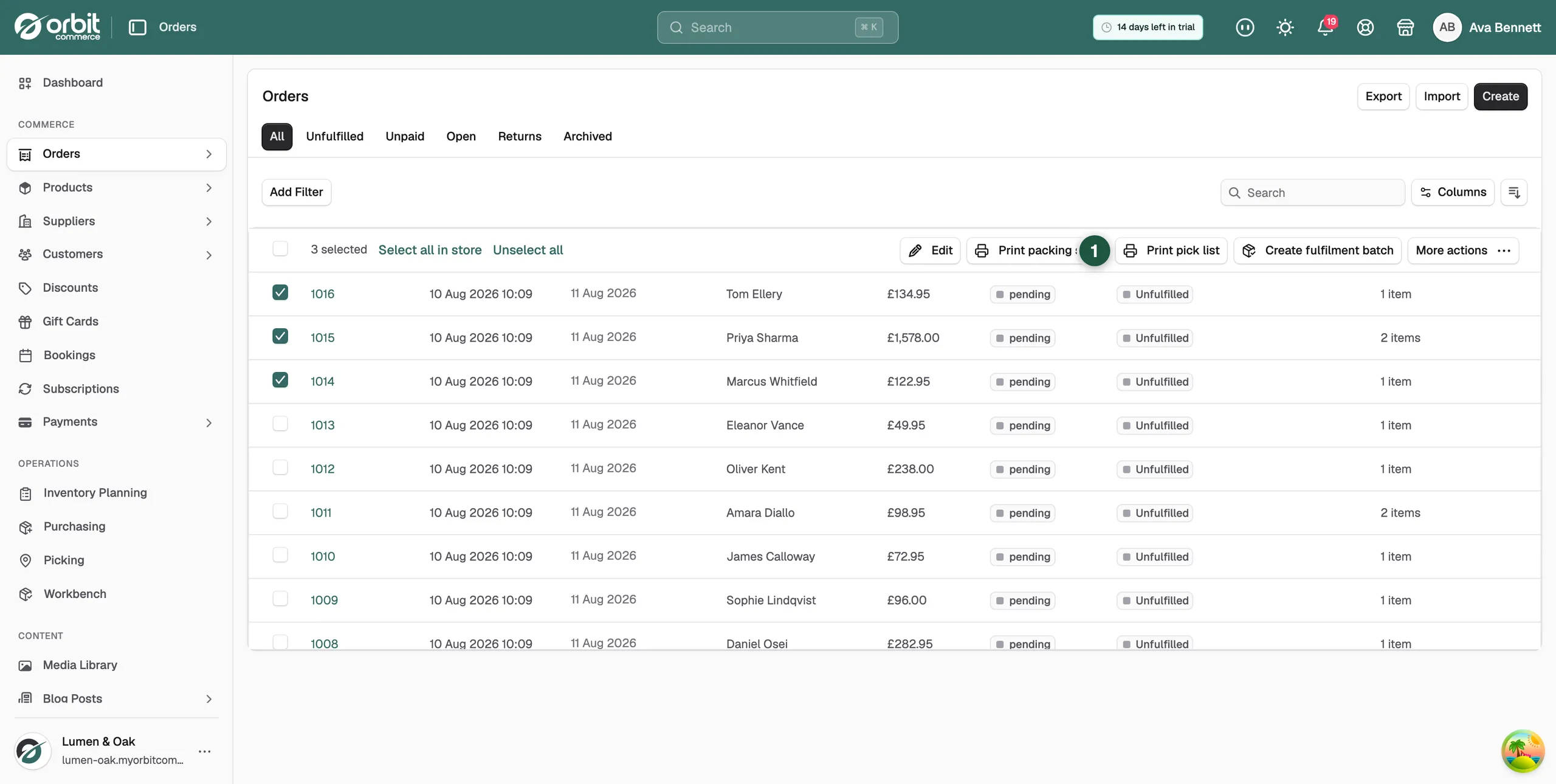
What you can do in bulk
- Edit: edit the ticked orders together.
- Print packing slips: one slip per order, in a new tab, ready to print.
- Print pick list (Enterprise): one combined pull sheet for the whole selection, up to 100 orders. It only lists units still to pick, so you can print it again after a partial fulfilment.
- Create fulfilment batch (Enterprise): send the selection to the Workbench as a named dispatch run, up to 250 orders.
- More actions: Mark as paid, Mark as unpaid, Mark as fulfilled, Mark as unfulfilled, Issue refund, Cancel order and Archive orders.
Print packing slips for the ticked orders
- Click Unfulfilled above the table.
- Tick the box in the table header to select every order on the page.
- Click Print packing slips. A new tab opens and shows Generating packing slips… while the slips are made.
- Wait for the slips to appear. Your browser's print window then opens on its own.
- Choose your printer and print. You get one slip per order, in the same order as the list.
Note: A packing slip shows the items and quantities, the ship-to and bill-to addresses, and your branding. It does not show prices. For those, print the order itself.
Mark orders as fulfilled or paid
- Tick the orders.
- Click More actions on the right of the bar.
- Click the action you want, such as Mark as fulfilled or Mark as paid.
- If Orbit asks you to confirm, read the message and click to go ahead. The list updates.
Cancel or archive orders
- Tick the orders.
- Click More actions.
- Click Cancel order to cancel them. Orbit asks you to confirm and to give a reason. Or click Archive orders to move them out of the main list. Archived orders stay under the Archived chip.
Warning: Cancelling a paid order refunds the customer. Check the selection before you confirm.
Related guides
Was this helpful?
0 people found this helpful