Recovering an abandoned checkout
Send a recovery email by hand from an abandoned checkout, or switch on automatic recovery emails with a timing, subject and optional discount code.
You can win back a customer who left items in their cart. Send a recovery email by hand from the checkout page, or switch on automatic emails so Orbit sends them for you. Both start under Orders, then Abandoned Checkouts. For what the list shows, see Reviewing abandoned checkouts.
Considerations
- A recovery email needs an email address. Send Recovery Email is greyed out on a cart that shows No email.
- Sending by hand works whether or not automatic recovery emails are switched on.
- The email has a link back to the customer's cart. If you have a discount switched on in Settings, the code is included.
- Changes on the Abandoned Cart settings page save as you make them. There is no Save button.
Send a recovery email by hand
- From your Orbit dashboard, go to Orders.
- Click Abandoned Checkouts.
- Click Not sent above the list. These are the carts nobody has chased yet.
- Click anywhere on the row to open the cart.
- Check the Cart Items table so you know what they left behind.
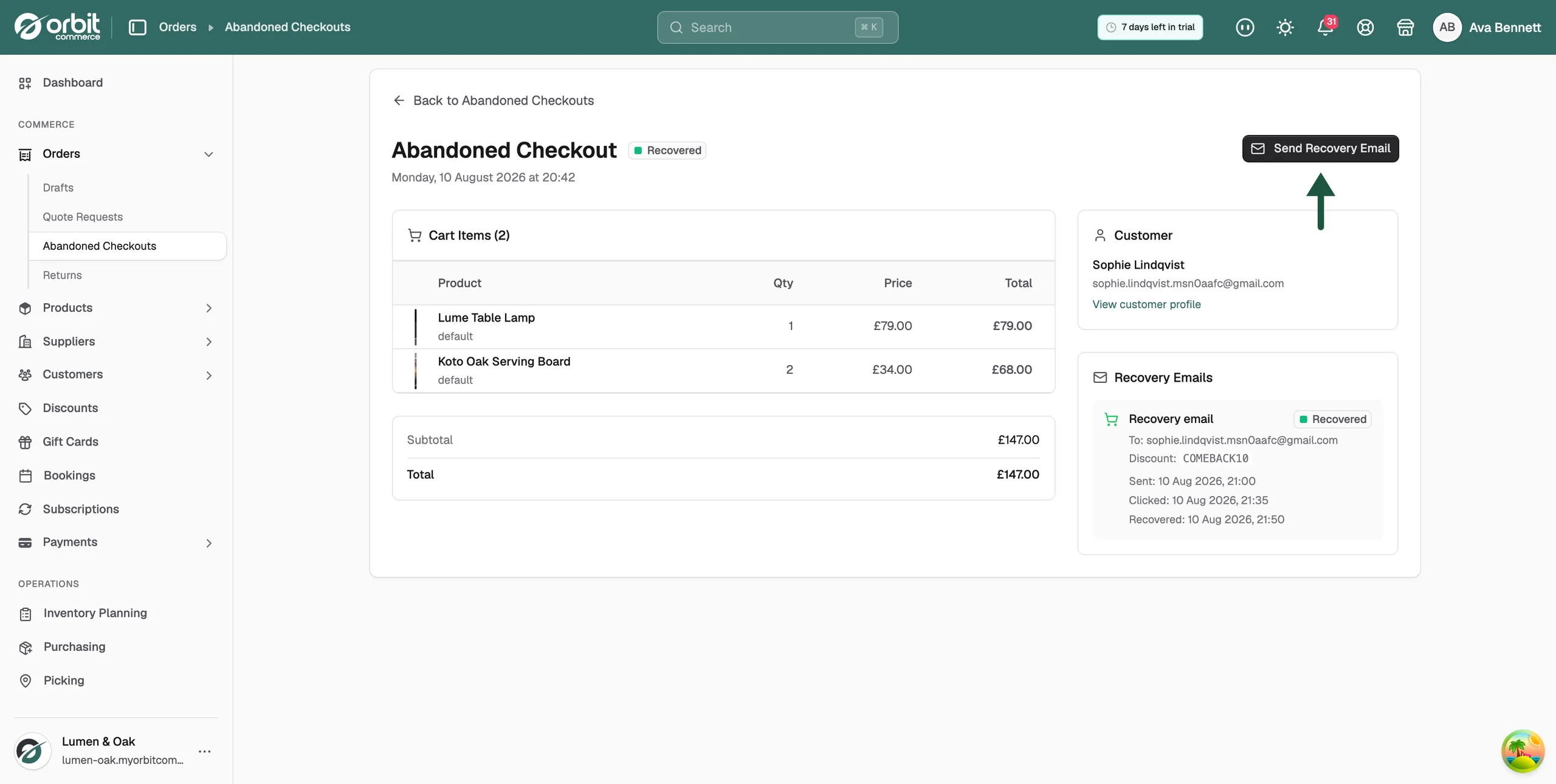
- Click Send Recovery Email at the top right.
- Check the Email address field. Orbit fills it in from the cart. If the field is empty, type the address.
- Click Send Email. The message Recovery email sent appears, the badge changes to Queued, and a new entry appears under Recovery Emails.
- Click Back to Abandoned Checkouts. The cart now shows Queued under All. It changes to Sent once the email has gone out.
Tip: For a large basket, a personal email or phone call often works better than the automatic message. The customer's details are on the checkout page. Click View customer profile to see their history.
Switch on automatic recovery emails
Once switched on, Orbit emails every abandoned cart that has an email address, after the wait you choose.
- From your Orbit dashboard, go to Settings.
- Click Abandoned Cart. There is no sidebar entry for this page, so open it from the Settings page.
- Under Timing, choose how long Orbit waits after the last cart activity before sending. The options are 1, 2, 4, 6, 12 or 24 hours.
- Under Email Subject, type the subject line the customer sees. The default is You left something behind!
- To include a discount code, switch on the discount and set Discount Type (Percentage or Fixed Amount), Discount Value and Code Prefix. The default prefix is RECOVER.
- To change how the email looks, click Customise Template. This opens the email in the template editor.
- Under Send Test Email, type your own address and click Send. Check the email arrives and reads well.
- Switch on Enable Recovery Emails. The badge at the top changes from Disabled to Active and the message Abandoned cart settings updated appears.
Note: A discount code in a recovery email costs you margin on every recovered order. Check how often the codes are used before making the discount bigger.
Track what happens next
- Recovery column: the list shows each cart moving from Sent to Clicked to Recovered.
- Recovery Emails panel: on the checkout page, each email shows the address, the discount code, and the time it was sent, clicked and recovered.
- Recovery Analytics: the Abandoned Cart settings page shows totals once emails have been sent.
- Orders: a recovered cart becomes a normal order in your Orders list. Fulfil it as usual.
Related guides
Was this helpful?
0 people found this helpful