Migrating from Shopify
The order to move a Shopify shop to Orbit: set the store up, import products and customers, rebuild collections, then point your domain last.
3 min read9viewsUpdated 10 October 2026Orbit Commerce
Moving from Shopify is a set of exports and imports, then a short list of things to rebuild. Work through the steps in this order and you will not have to redo anything.
Considerations
- Orbit recognises a Shopify product export and matches its columns for you. You should not need to map anything by hand.
- Product images come across from the web addresses in the file, so keep your Shopify store live until the import has finished.
- Passwords never move. Customers set a new password the first time they sign in.
- Your Shopify theme does not move. Pick an Orbit theme and adjust it in the page builder.
- Products import live unless the file says otherwise. A product with no price imports as a draft.
1. Set up your Orbit store first
- Create the store and choose your plan.
- Set your currency, timezone and units.
- Set up your shipping zones and rates.
- Leave your domain where it is. You point it at Orbit at the very end.
2. Move your products
- In Shopify, go to Products, then Export, and export all products as a CSV.
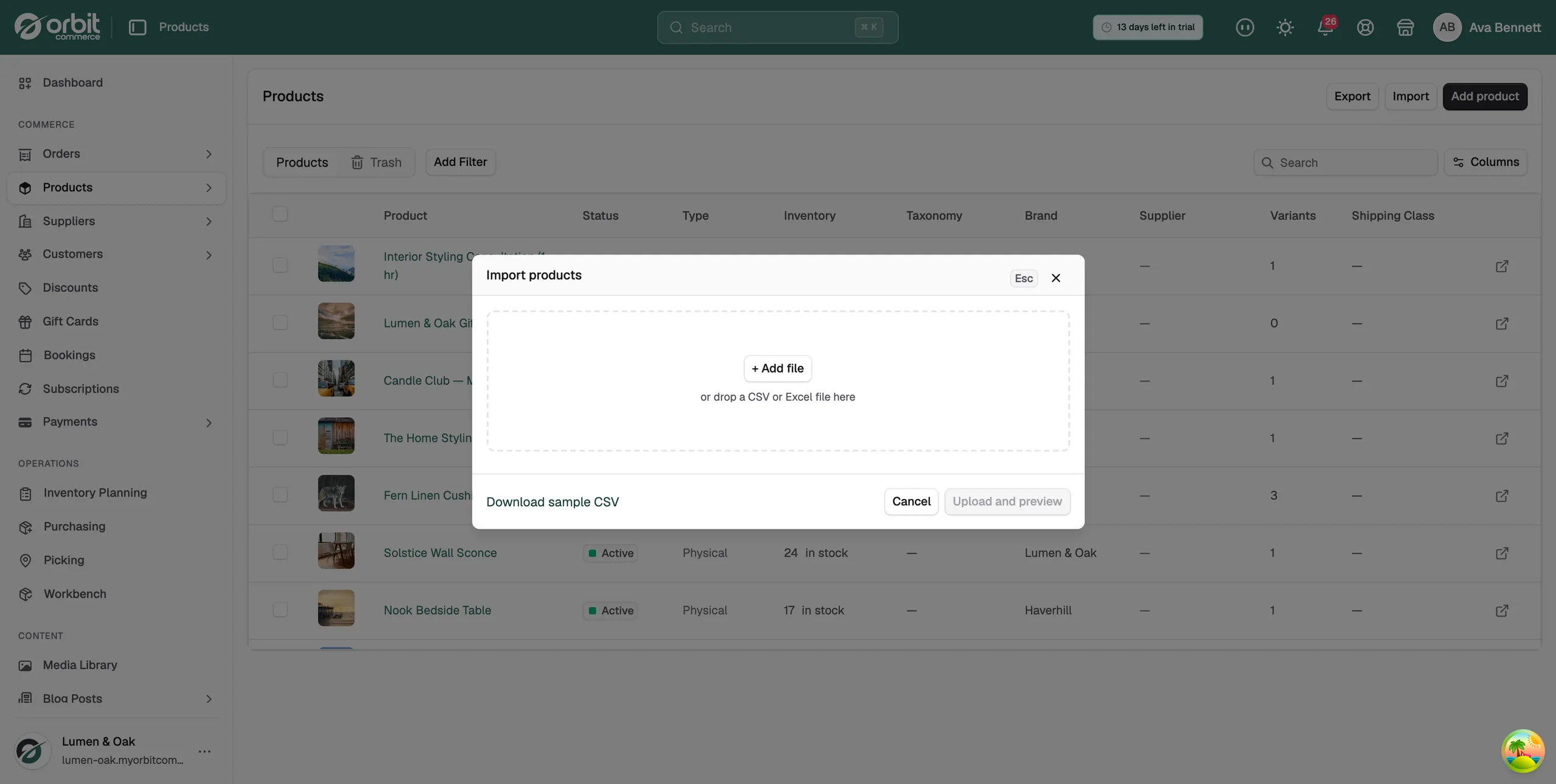
- From your Orbit dashboard, go to Products and click Import.
- Click + Add file and choose the Shopify CSV.
- Leave Create new products ticked and click Upload and preview.
- Check the product count against your Shopify catalogue, then open Column mappings and read what Orbit matched.
- Click Import products. You can close the dialog and the import carries on.
Tip: Import ten products first. Look at one with several variants on your storefront, then run the full file.
3. Move your customers
- In Shopify, go to Customers, then Export.
- From your Orbit dashboard, go to Customers and click Import.
- Add the file, check the mapping and import.
- Plan an email telling customers about the new shop and asking them to set a new password.
4. Rebuild your collections as categories
- Create a category in Orbit for each Shopify collection you want to keep.
- Filter your product list by the tag or product type that matches the collection.
- Add the filtered products to the category in bulk, rather than one at a time.
5. Finish before you point your domain
- Add a redirect for every Shopify address that matters. Shopify product addresses start with /products/ and Orbit's do not, so this is what protects your search traffic.
- Recreate the discount codes that are still running.
- Reissue any gift cards that still have a balance on them.
- Export your Shopify orders and keep the file. Past orders stay in that export rather than importing as live orders.
- Order something on the Orbit store yourself and check the whole checkout.
- Point your domain at Orbit.
Note: Keep your Shopify store open and read only for a month after you switch. It is your copy of record while you settle in.
Related guides
Was this helpful?
0 people found this helpful