Paying for shipping labels
Labels you buy from Orbit go on a running balance and your saved card is charged for you. Thresholds, invoices, failed payments, voids and credits.
When you buy shipping labels through Orbit, there is nothing to top up first. Each label goes on a running balance. Orbit then charges your saved card for you. Every charge comes with an itemised invoice. You find all of this in your Orbit dashboard under Settings, then Shipping, then the Courier Integrations tab, then Orbit Shipping.
Considerations
- You need a valid card saved before you can buy a label.
- This only covers labels you buy from Orbit. Your own carrier account bills you direct.
- Label buying stops while a payment is unpaid or unconfirmed. Tracking, downloads and voids keep working.
How a label is paid for
- Buy labels as normal. Each one goes on your shipping balance.
- Orbit charges your card when that balance reaches your billing threshold, or at the end of the billing cycle.
- You get an invoice for every charge. It lists the labels, credits and changes it covers.
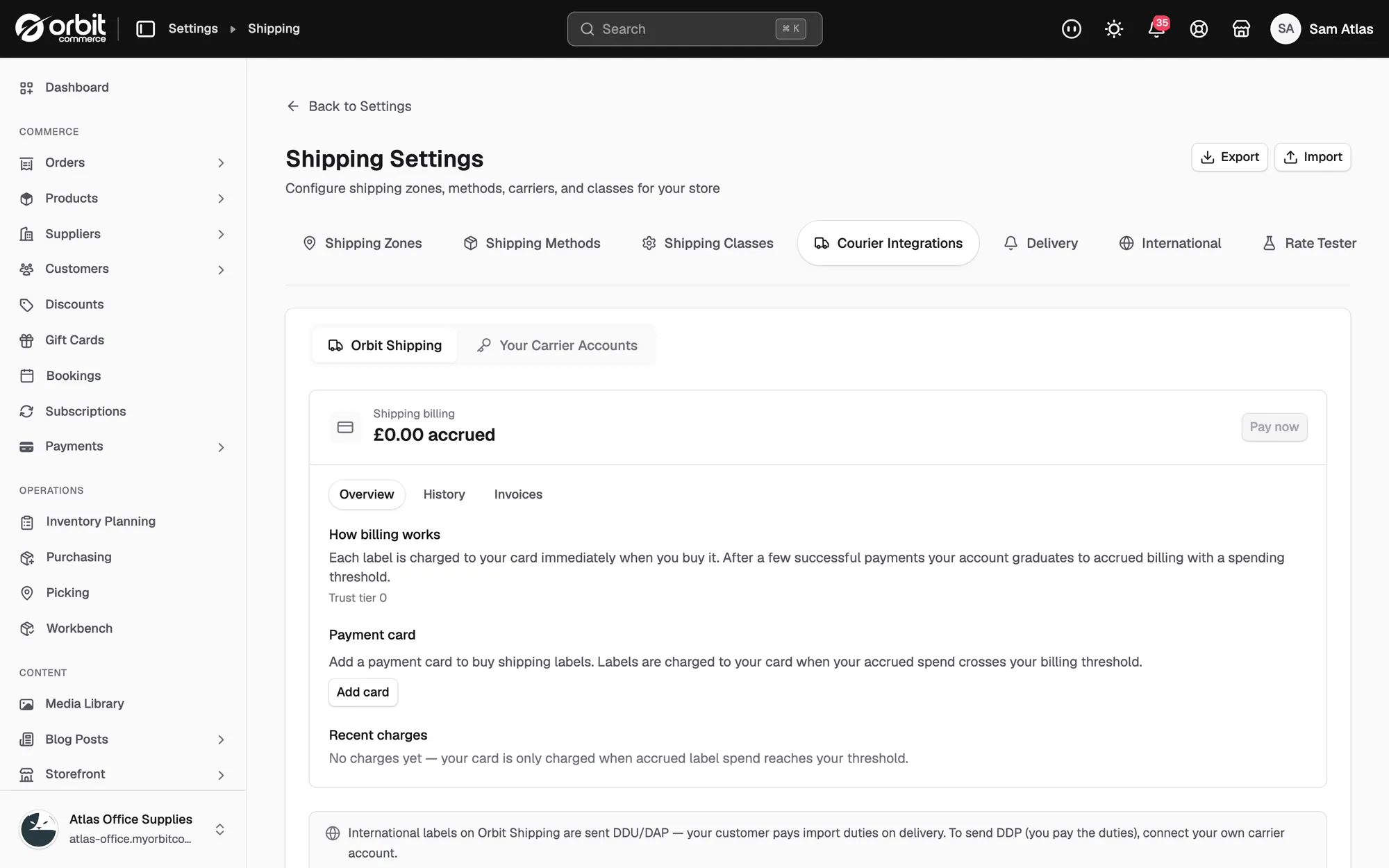
The panel is headed Shipping billing. Under that you see how much you owe, shown as an amount and the word accrued. If you have credit instead, it reads as an amount and the word credit.
Three tabs sit under the heading:
- Overview: how your billing works, your card, and your last few charges.
- History: every line on your balance, with a Date, Type and Description. Types include Label, Settlement, Void Refund and Adjustment.
- Invoices: your invoices and credit notes. Each row has a Document number, a Type, a Date, an Amount and a Status. Click the row to download the PDF.
Your billing threshold
Your threshold is the amount you can run up before Orbit charges your card. It starts small and grows as you build a record of payments that go through. Busy shops end up charged less often, in larger amounts.
A brand new shop pays per label. The card is charged at the moment you buy, and the label is released once the charge goes through. After your first few payments, labels are released at once and billing moves to the threshold.
Your current threshold is shown on the Overview tab, next to your trust tier.
Your saved card
- On the Overview tab, find Payment card.
- Click Add card if you have none saved, or Replace to swap the one you have.
- Remove takes the card off your shop. You cannot buy labels without one.
Future charges use whichever card is saved at the time.
When your bank asks you to confirm
Banks sometimes ask you to approve a payment yourself. Label buying pauses until you do.
- An orange bar appears on the panel. It says your bank needs you to confirm your last shipping payment.
- Click Confirm payment and follow your bank's steps.
- To use a different card instead, click Pay another way.
Label buying starts again as soon as the payment goes through.
When a payment fails
Label buying pauses straight away and the panel shows what you owe. A red bar tells you the amount that failed.
- Click Pay now to try the same card again.
- Click Update card if the card is the problem, then pay.
- Orbit also retries on its own, 1, 3 and 5 days after the failure. You get an email each time.
Warning: If your bank is asking you to confirm, retries against that card will keep failing. Confirm the payment or save a new card. Waiting will not fix it.
Voids and credits
- Void a label before it has been billed and the cost comes off your balance. You are never charged for it.
- Void a label after it has been billed and the amount goes on your balance as credit. That credit is used up before your card is charged again.
- Close your shop with credit left and it is refunded to the card that paid. See the Shipping Billing Terms.
Carrier adjustments
Couriers weigh and measure parcels after they collect them. If a parcel turns out bigger or heavier than you declared, the difference goes on your shipping balance. It is collected with your other charges.
You see it in your dashboard against the shipment, and on the History tab as an Adjustment.
Using your own carrier account
If you have connected your own account with a courier, that courier bills you under your own agreement with them. Orbit shipping billing is not used for those labels.
You can see your own accounts under Settings, then Shipping, then Courier Integrations, then Your Carrier Accounts.
Note: Questions about a charge or an invoice go to support@orbitcommerce.net. Quote the invoice number. Every charge can be traced back to the labels behind it.
Related guides
Was this helpful?
0 people found this helpful