Understanding storefront search
What customers see when they search your store, where the match, result type and visibility settings live, and what the search rules, keywords and redirects add.
Storefront search is the search box your customers use to find things in your store. Visitors who search are far more likely to buy than visitors who browse, so it is worth checking what your search returns. This guide explains what customers get by default and where the settings live.
What customers get by default
The search box is a page builder element. Its position and style follow your theme, and most stores put it in the header. When a customer types, search shows matching products. It can also show collections, pages and blog posts, and it can offer suggestions as they type.
Note: Products are always matched by name. Search can also look in SKUs and barcodes, brand names, product tags, descriptions and custom fields, depending on your settings.
Change how search behaves
The behaviour settings are under Settings, then Search. Changes apply to every search box on your published pages at once. You do not need to publish again.
- From your Orbit dashboard, go to Settings.
- Click Search.
- Change the settings you want, then click Save. The message Search settings saved appears.
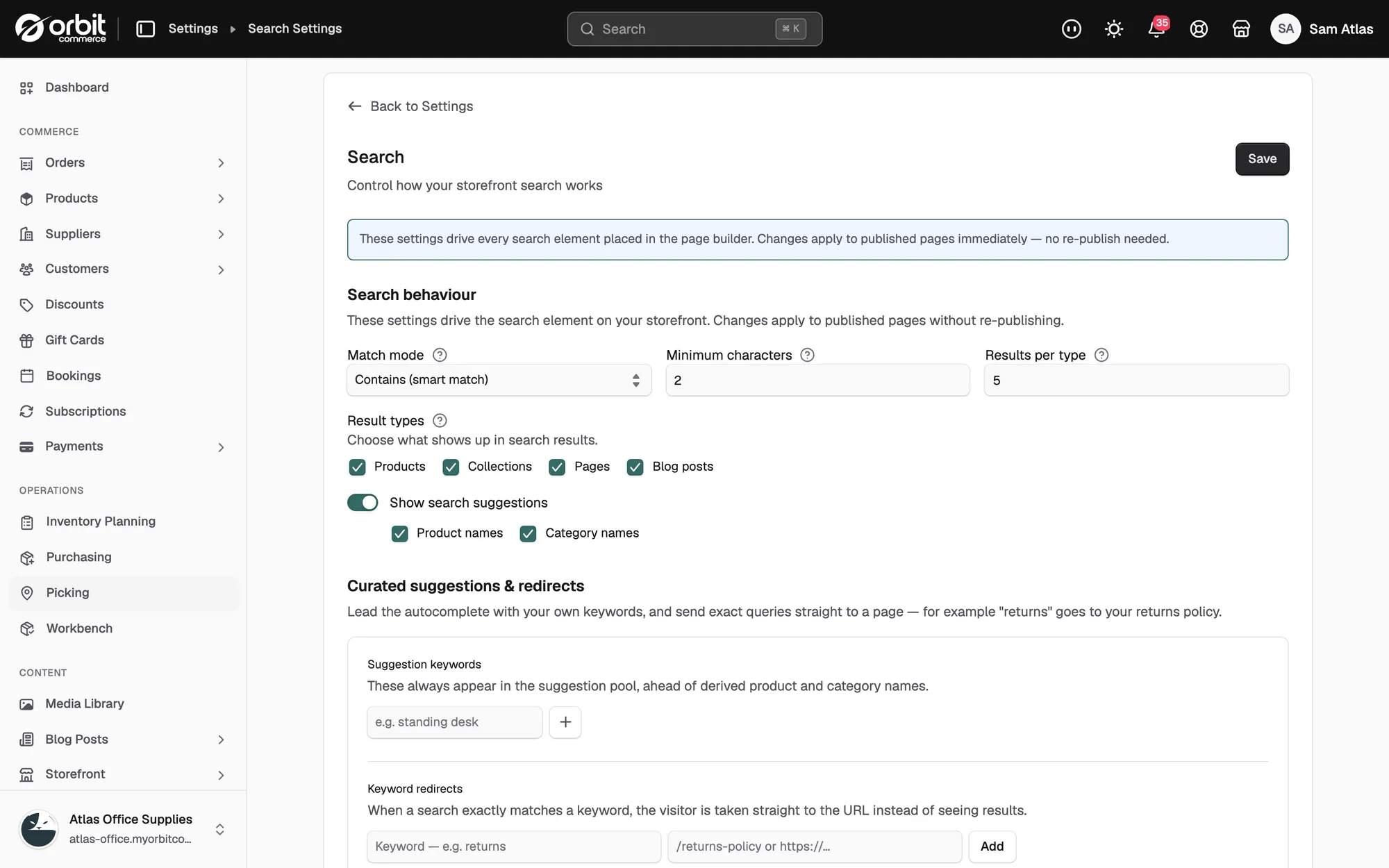
The main settings are:
- Match mode: how forgiving matching is. Contains (smart match) finds the term anywhere and copes with partial words. Starts with matches from the start of a word. Exact match needs the whole term, which suits SKU or part number searches.
- Minimum characters: how many letters a customer types before results appear.
- Results per type: how many results to show for each type.
- Result types: whether Products, Collections, Pages and Blog posts appear in results.
- Show search suggestions: turns the as-you-type suggestions on or off.
- What search matches: the fields search looks in, plus any searchable custom fields such as part numbers.
- Hidden from search: products, categories and pages that never appear in search. They stay reachable by direct link, menus and category browsing.
- Who can see search results: a default of Everyone, Logged-in customers or Customers with tags, plus Visibility rules that restrict specific products or categories. Useful for trade catalogues.
For the full walkthrough, see Controlling storefront search.
Hide one product from search
- From your Orbit dashboard, go to Products and open the product.
- In the menu on the left, click Search engine listing.
- Switch on Hide from search results. The product stays visible on category pages and by direct link.
- Click Save.
Go further with search rules, keywords and redirects
The Search page under Settings adds a merchandising layer on top of the settings above:
- Visibility rules: hide specific products, categories or tagged products from chosen audiences, such as guests only or specific customer groups.
- Suggestion keywords: add your own suggestion terms.
- Redirects: send an exact search, such as "delivery" or "returns", straight to the right page.
See Controlling storefront search.
Tip: Once a month, search your own store for your ten best products. If they do not come top, adjust your settings. Your analytics show the Top Search Term, and searches that return nothing are a good place to add content or a redirect.
Related guides
Was this helpful?
0 people found this helpful