Taking deposits and setting cancellation policies
Charge a deposit instead of the full fee, write the policy customers see at checkout, and set the percentage you keep when a booking is cancelled.
Two settings on a service product protect your diary. Payment type decides what the customer pays when they book. Cancellation fee (%) decides what you keep if they cancel. Both sit in the Service details section of the product.
Considerations
- The Cancellation policy text is display only. It withholds nothing on its own.
- Cancellation fee (%) is what Orbit actually keeps. It is a flat percentage of what the customer paid, from 0 to 100, and it starts at 0, which means a full refund.
- There are no time based tiers. A fee above zero applies to every cancellation, however much notice you get.
- A fee above zero needs policy text above it. Make the two match.
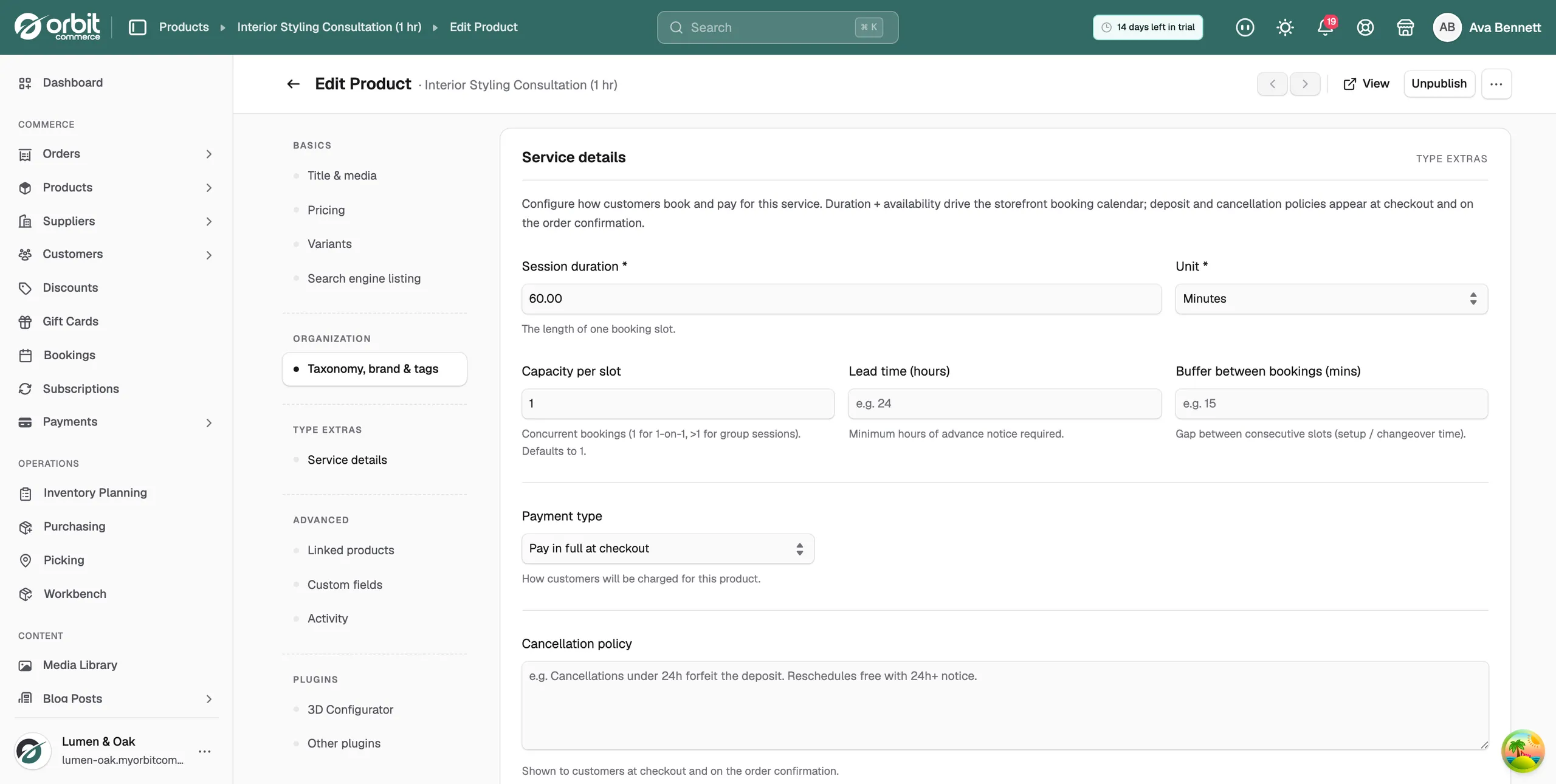
Take a deposit instead of full payment
- From your Orbit dashboard, go to Products and open your service product.
- In the menu on the left, click Service details.
- Click Payment type and pick Deposit + balance.
- A Deposit percentage field appears. Type the percentage you want up front, for example 25. The balance is due on the day.
- Click Save.
The three payment types are:
- Pay in full at checkout: the customer pays the whole fee when they book.
- Deposit + balance: a percentage now, the rest on the day.
- Installments (scheduled payments): payment split across a plan you set up after the product is saved.
Tip: Set a deposit that makes a no-show hurt. Between 20 and 50 per cent is the usual working range.
Write your cancellation policy
- In Service details, scroll to Cancellation policy.
- Type your terms in plain words: how late a customer can cancel or move a booking, and what it costs them.
- Click Save.
The text appears at checkout and on the order confirmation. Write it to be read, not as legal cover. For example: "Cancellations under 24h forfeit the deposit. Reschedules free with 24h+ notice."
Set the cancellation fee
- In Service details, find Cancellation fee (%) below the policy.
- Type the percentage of the paid amount you keep when a booking is cancelled, for example 25.
- Click Save.
Warning: A policy that says "under 24h forfeit the deposit" with the fee left at 0 refunds the customer in full. The fee field is the one that moves money.
When you cancel a booking from the Bookings page, the customer is refunded what they paid, less this percentage. See Managing bookings.
Which pair to use
- Busy, low value services such as classes and haircuts usually run full payment with a strict policy.
- High value consultations usually run a deposit with a flexible reschedule, and settle the balance after the work.
- Any policy beats no policy. Customers read it at checkout, which is the only moment it can change what they do.
Related guides
Was this helpful?
0 people found this helpful